How to Sell PDF Workbooks Without Losing Control
Selling a PDF workbook is easy. Keeping control after the buyer receives it is the hard part.
A workbook, template pack, coaching worksheet, or paid study guide can be copied in seconds if it is delivered as a normal PDF attachment. One buyer can forward it to a group chat, upload it to a file-sharing site, or keep using it after a refund.
The goal is not to make copying impossible. No PDF security tool can stop someone from taking a photo of a screen with another phone. The practical goal is to make abuse less convenient, keep future access controllable, and make leaks easier to trace.
MaiPDF gives creators two delivery paths:
- Online Cloud Sharing for fast controlled browser links, QR codes, expiry, view limits, and watermarks.
- App DRM /
.maipdffor stronger workbook protection with device binding, revocation, and screenshot-aware protected reading.
Why normal PDF delivery loses control
Most creators sell workbooks through simple delivery methods:
- email attachment
- cloud-drive download link
- checkout file download
- LMS file upload
- private community post
These methods are convenient, but they usually send the raw PDF. Once the buyer downloads it, the creator cannot reliably control where it goes next.
Common problems include:
- buyers forwarding the file to friends
- one business purchase being shared with an entire team
- refunded buyers keeping the workbook
- old versions continuing to circulate
- screenshots being posted without attribution
- resellers bundling the workbook into their own product
A shared password is not enough. If the password can be forwarded with the PDF, it does not protect the business.
Choose the delivery model by value
Not every workbook needs maximum security.
| Product type | Recommended MaiPDF path |
|---|---|
| Free checklist | Online Cloud Sharing |
| Sample chapter | Online link with expiry |
| Low-cost worksheet | Online link with watermarking |
| Paid workbook | App DRM / .maipdf |
| Premium coaching pack | App DRM / .maipdf |
| Certification or exam material | App DRM / .maipdf |
| Corporate training workbook | App DRM / .maipdf |
Use browser links when the goal is easy access. Use App DRM when the PDF itself is the paid product.
Option 1: Online Cloud Sharing for lightweight products
With MaiPDF Online Cloud Sharing, the creator uploads a PDF and shares a managed reading link or QR code instead of a raw file.
This is useful for:
- samples and previews
- low-risk workbooks
- webinar downloads
- time-limited bonuses
- simple paid handouts
- large audiences where app installation would reduce completion
Useful controls include:
- expiry dates
- open limits
- dynamic watermarking
- access records
- link disabling or replacement
- QR code delivery
This is already safer than sending an attachment because the creator keeps some control over the access path.
Option 2: App DRM for paid workbook protection
For higher-value products, use MaiPDF App DRM.
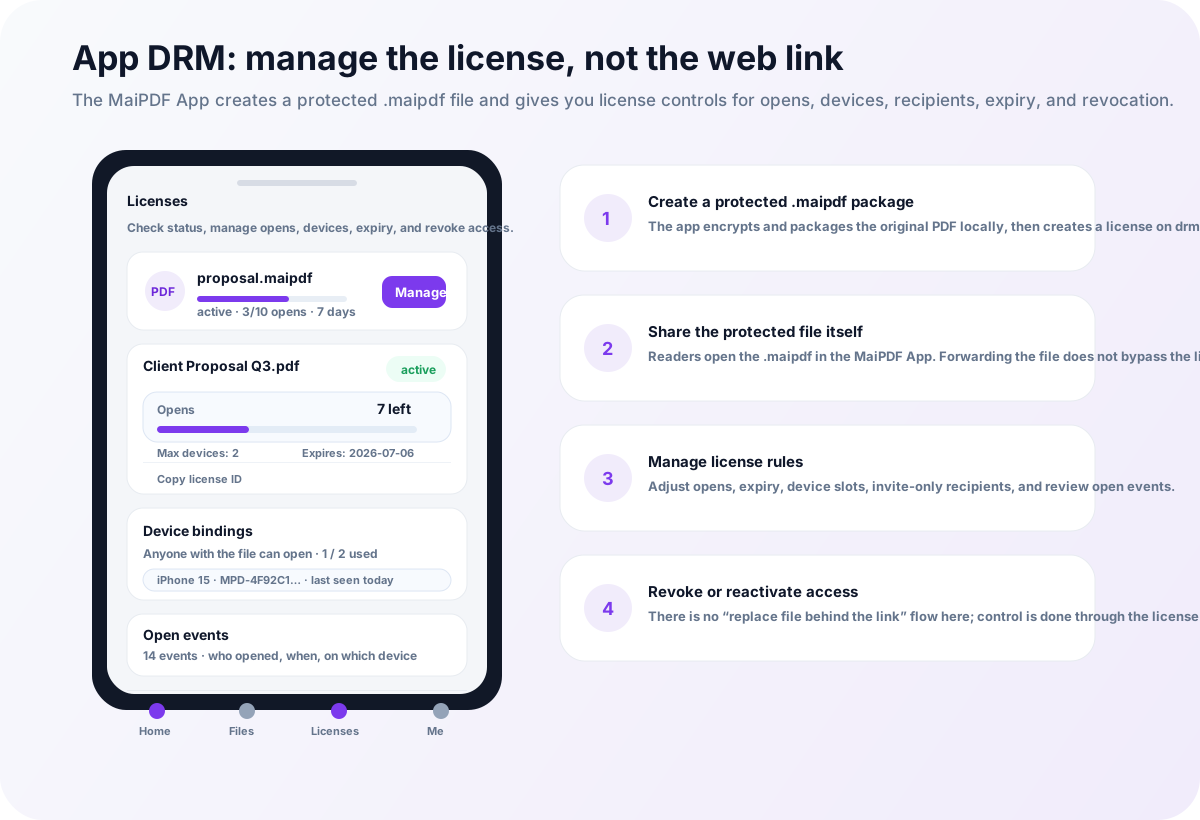
In this workflow, the PDF workbook is protected as a .maipdf file. Buyers open it inside the MaiPDF App, not in a normal PDF reader.
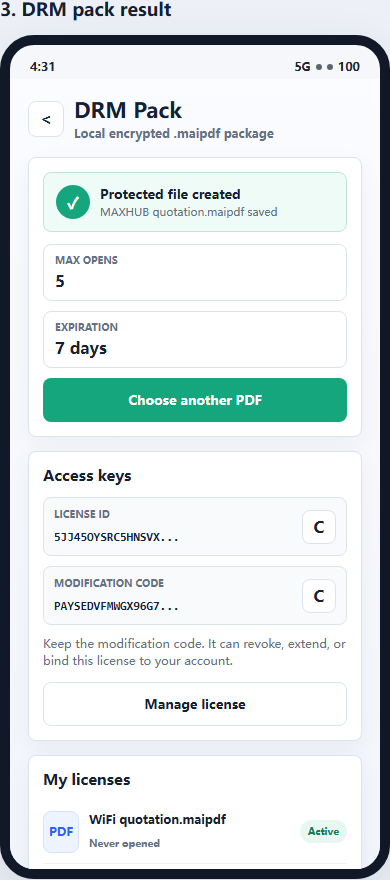
That changes the buyer experience in an important way:
- the file alone is not enough
- access can require a license check
- devices can be limited
- access can expire
- access can be revoked after refunds or abuse
- the reader uses a protected viewer
- screenshot-aware controls can be applied where supported
This is the better model for paid workbooks because it keeps control attached to the reading path instead of relying only on buyer honesty.
Recommended controls for selling workbooks
| Control | Why it helps |
|---|---|
| Watermarking | Makes leaked screenshots and pages traceable |
| Expiry | Ends access after a course, cohort, or bonus window |
| View limits | Useful for samples and limited previews |
| Device binding | Reduces one-buyer-many-users abuse |
| License revocation | Stops future access after refunds or chargebacks |
| Protected reader | Keeps high-value workbooks out of ordinary PDF readers |
| Access records | Helps spot unusual sharing patterns |
The strongest setup is usually .maipdf plus watermarking, device limits, expiry, and revocation.
Refunds and chargebacks
Refunds are a normal part of selling digital products. The problem is that a normal PDF cannot be called back.
If a buyer downloads the original PDF, they can keep it after the refund. If the file is protected through a controlled reading path, the creator has a better option: revoke or disable future access.
Revocation does not erase screenshots already taken, so it should be paired with watermarking and reasonable access windows.
For a deeper refund-specific workflow, see How to Revoke Course PDF Access After a Refund.
A practical selling workflow
A safer workbook-selling workflow looks like this:
- Create the workbook PDF.
- Decide if it is a lightweight resource or a high-value product.
- Use Online Cloud Sharing for samples and low-risk downloads.
- Use App DRM /
.maipdffor paid core workbooks. - Add watermarking so leaks are traceable.
- Set expiry or device limits where appropriate.
- Send buyers clear access instructions.
- Revoke access when refunds, failed payments, or abuse happen.
The main principle is simple:
Do not sell a high-value workbook as an uncontrolled file.
Quick recommendation
If the workbook is a free lead magnet or low-risk handout, use MaiPDF Online Cloud Sharing with expiry, watermarks, and tracking.
If the workbook is paid, premium, easy to resell, or part of a course, use MaiPDF App DRM and deliver it as a protected .maipdf file.
For the broader education workflow, read PDF DRM for Online Courses. If student forwarding is the main risk, read How to Prevent Students from Sharing Course PDFs.