How to Prevent Students from Sharing Course PDFs
When students pay for a course, worksheet, certification pack, or exam-prep PDF, the file can quickly become the product. If one student forwards it to a group chat, the creator may lose sales and control.
The goal is not to make leaking impossible. No software can stop someone from taking a photo of a screen with another phone. The practical goal is to reduce easy sharing, keep access controlled, and make leaks easier to trace.
MaiPDF helps with two levels of protection. If you need the broader course-business overview, start with PDF DRM for Online Courses. For exam-focused materials, see How to Protect Exam Prep PDFs from Sharing and Screenshots.
- Online Cloud Sharing for fast controlled links, QR codes, expiry, view limits, and watermarks.
- App DRM /
.maipdffor stronger control with device binding, revocation, and screenshot-aware protected reading.
Why students share PDFs so easily
Most course PDFs are delivered in one of these ways:
- email attachment
- cloud-drive download link
- LMS download button
- group chat file
- public browser link
These methods are convenient, but they create a simple problem: once the student downloads the raw PDF, the teacher or creator usually cannot control what happens next.
The student can:
- forward it to classmates
- upload it to a group chat
- share the password with others
- save it after a refund
- copy it to another device
- resell it as part of another bundle
That is why the delivery method matters as much as the PDF itself.
Step 1: Stop sending raw PDF attachments
The first improvement is simple: do not send the original PDF file when the material has commercial value.
Instead, send controlled access.
Controlled access can mean:
- a managed online reading link
- a QR code with expiry
- a view-limited link
- a watermarked reading page
- a protected
.maipdffile - a license that can be revoked later
This does not remove all risk, but it gives the creator tools that a normal attachment does not have.
Step 2: Use watermarks that identify the reader
Watermarks are one of the most useful controls for educational material.
A good watermark can include information such as:
- student name or email
- order ID
- license ID
- access time
- course name
If a screenshot or copied page appears online, the watermark can help identify where it came from. Even when a watermark does not stop a leak directly, it discourages casual sharing because the student knows the file is traceable.
For low-risk course materials, watermarking plus online access control may be enough.
Step 3: Add expiry and view limits
Course PDFs often only need to be available for a specific period.
Examples:
| Use case | Useful control |
|---|---|
| 7-day workshop notes | Expiry after the event |
| Sample lesson PDF | View limit or short expiry |
| Homework packet | Class-term access window |
| Paid exam-prep material | Expiry plus device control |
| Refund or chargeback | Revoke future access |
With MaiPDF online sharing, a creator can use browser-based controls such as expiry, view limits, access records, and watermarking without asking every student to install an app.
That is useful for large classes, open workshops, and low-friction distribution.
Step 4: Use App DRM when the PDF is the product
If the PDF is a paid workbook, certification guide, internal training manual, or high-value exam-prep pack, browser sharing may not be enough.
In that case, use MaiPDF App DRM.
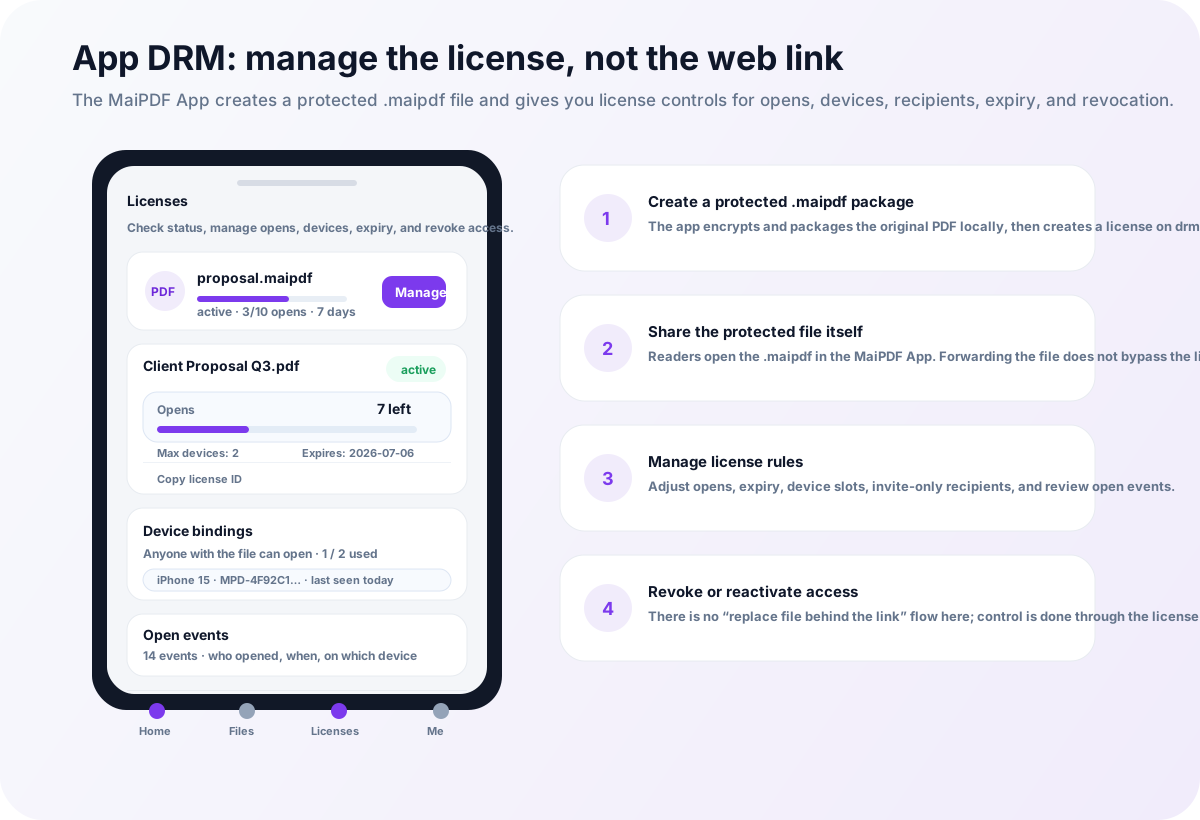
With App DRM, the PDF can be protected as a .maipdf file and opened inside the MaiPDF App. Access depends on permission, not just possession of the file.
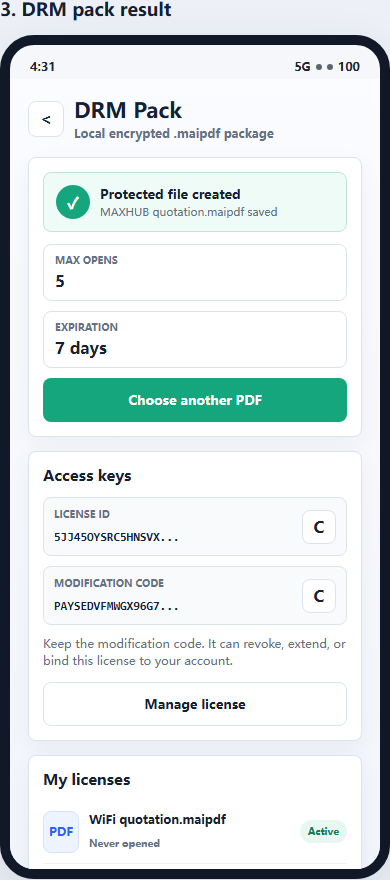
This is useful because a forwarded protected file is not automatically useful to another person. The reader still needs authorization to open it.
App DRM can support stronger controls:
- device binding
- license revocation
- expiry
- open limits
- protected reader access
- screenshot-aware controls where supported by the platform
- watermarking and traceability
Step 5: Bind access to approved devices
Device binding helps reduce one common abuse pattern: one buyer sharing access with many people.
For example, a course creator may allow one student to open the material on one or two approved devices. If the same file or license starts appearing across too many devices, the creator can review or restrict access.
Device binding is especially useful for:
- paid exam preparation PDFs
- professional certification materials
- internal corporate training
- premium coaching workbooks
- high-value downloadable templates
It is not necessary for every free handout. It is useful when uncontrolled redistribution would hurt the business.
Step 6: Revoke access when needed
A secure PDF workflow should support post-delivery control.
Revocation is useful when:
- a student receives a refund
- a payment fails
- a license is abused
- a course subscription ends
- a company training contract expires
- a protected file is shared outside the intended group
A normal PDF attachment cannot be called back. A controlled link or protected .maipdf file gives the creator a way to stop future access through the controlled reading path.
Revocation does not erase screenshots already taken, so it should be paired with watermarking.
Recommended MaiPDF setup by course type
| Course material | Recommended setup |
|---|---|
| Free checklist | Online link, optional watermark |
| Trial lesson | Online link with short expiry |
| Workshop handout | Online link with expiry and tracking |
| Paid workbook | App DRM / .maipdf, watermark, revocation |
| Exam-prep PDF | App DRM / .maipdf, device binding, expiry |
| Corporate training manual | App DRM / .maipdf, team licenses, revocation |
| Certification material | App DRM / .maipdf, device control, watermarking |
The more valuable the PDF, the more the workflow should move from simple link sharing toward App DRM.
What to tell students
Security works better when the rules are clear.
A simple notice can say:
This course PDF is for your personal use only. Access may be limited by device, expiration, and watermarking. Do not forward or redistribute the material.
This sets expectations without sounding hostile. For paid content, the goal is to protect the course business while keeping the student experience reasonable.
A realistic anti-sharing strategy
A practical course PDF protection strategy looks like this:
- Avoid raw PDF attachments.
- Use online links for low-risk or high-convenience delivery.
- Add watermarks to discourage forwarding.
- Use expiry and view limits for time-bound access.
- Use
.maipdfApp DRM for paid core materials. - Bind access to approved devices when account sharing is a risk.
- Revoke access after refunds, abuse, or course expiration.
- Be honest that no tool can stop external phone photos.
This strategy does not promise magic. It gives creators practical control.
Quick recommendation
If the PDF is a free handout or sample lesson, use MaiPDF Online Cloud Sharing with watermarks, expiry, and tracking.
If the PDF is a paid workbook, exam-prep pack, certification file, or corporate training manual, use MaiPDF App DRM and distribute it as a protected .maipdf file with device binding, revocation, and screenshot-aware reading.
The safest rule is simple:
If students should not freely forward it, do not deliver it as a normal PDF attachment.