How to Protect Exam Prep PDFs from Sharing and Screenshots
Exam-prep PDFs are high-value documents. They often contain paid study notes, answer explanations, practice questions, certification guidance, or proprietary training methods.
That makes them a common target for forwarding. One student can share the PDF with a group, upload it to a forum, or keep using it after access should end.
The right protection strategy should reduce easy sharing, keep access revocable, and make leaks traceable.
MaiPDF provides two paths:
- Online Cloud Sharing for fast preview links, sample questions, expiry, view limits, and watermarks.
- App DRM /
.maipdffor stronger exam-prep protection with device binding, license revocation, and screenshot-aware protected reading.
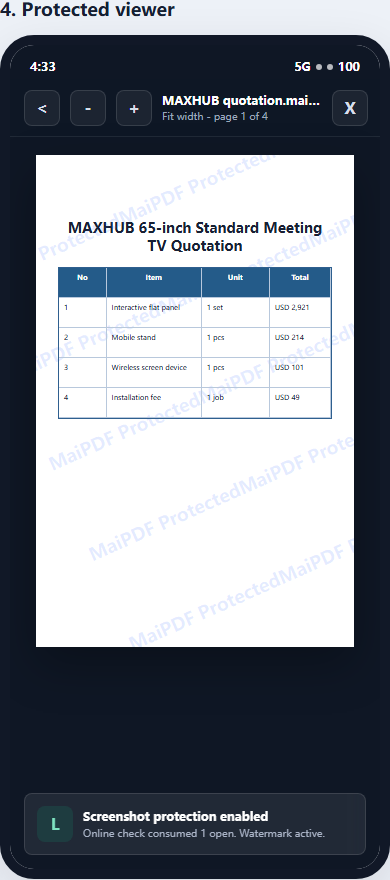
Why exam-prep PDFs need stronger control
Exam-prep content is different from ordinary class handouts:
- it is often paid
- it may be updated frequently
- it can be resold by others
- students have a strong incentive to share it
- answer explanations may lose value if leaked widely
- access may need to end after an exam date or course period
Sending the raw PDF gives away too much control. Even if the file is password-protected, the password can usually be forwarded with the file.
Use Online Cloud Sharing for samples and previews
MaiPDF Online Cloud Sharing is useful when the material should be easy to open in a browser.
Good uses include:
- sample question packs
- preview chapters
- free lead magnets
- time-limited webinar notes
- trial lessons
- post-class review handouts
Controls can include:
- short expiry
- open limits
- dynamic watermarks
- access records
- QR codes for classroom distribution
For previews, browser sharing is often enough because the main goal is conversion and convenience.
Use App DRM for paid exam-prep packs
For the paid core material, use MaiPDF App DRM.
The PDF can be protected as a .maipdf file and opened inside the MaiPDF App. This makes possession of the file less useful without authorization.
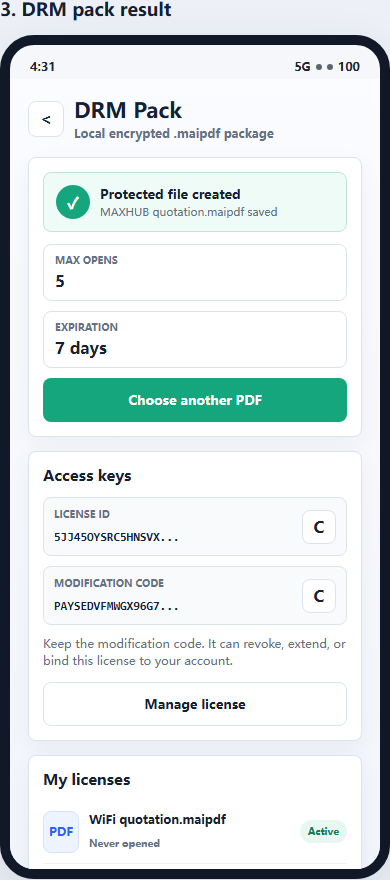
App DRM is better for exam-prep PDFs because it can support:
- device binding
- license revocation
- expiry after the exam window
- open limits
- protected reader access
- watermarking
- screenshot-aware controls where supported
This is especially useful for certification courses, paid test-prep packages, and internal training exams.
Recommended policy for exam-prep PDFs
| Risk | Recommended control |
|---|---|
| Students forwarding the file | .maipdf protected delivery |
| One account used by many people | Device binding |
| Access after exam date | Expiry |
| Refund or chargeback | License revocation |
| Screenshots of answer pages | Watermarking + protected reader |
| Public leak investigation | Access records + watermark tracing |
Do not rely on only one control. A practical exam-prep workflow combines several.
Example workflow
A safer exam-prep delivery workflow:
- Share a free sample pack with Online Cloud Sharing.
- Protect the full exam-prep PDF as
.maipdf. - Limit access to approved devices.
- Set expiry based on the exam date or course window.
- Add visible or dynamic watermarking.
- Monitor unusual access patterns.
- Revoke access after refunds, abuse, or course expiration.
This keeps the sample easy to access while protecting the paid core material more seriously.
What screenshot protection really means
A browser cannot fully block operating-system screenshots. App-based protected reading can reduce screenshot and screen-recording risk where the platform supports it.
But no tool can stop someone from pointing another phone at the screen. That is why watermarking matters: it turns many leaks into traceable leaks.
For more background, read Secure PDF Reader with Screenshot Protection.
Quick recommendation
Use Online Cloud Sharing for previews and samples.
Use App DRM / .maipdf for the full paid exam-prep PDF, especially when it contains answer explanations, premium study notes, certification content, or materials that should expire after a test window.
If your exam-prep product is part of a broader course, read PDF DRM for Online Courses. If the main issue is student forwarding, read How to Prevent Students from Sharing Course PDFs.