How to Revoke Access to a PDF After Sending
Sending a normal PDF is usually a one-way action. Once the file is attached to an email, uploaded to a chat, or copied to another device, the sender has almost no control left.
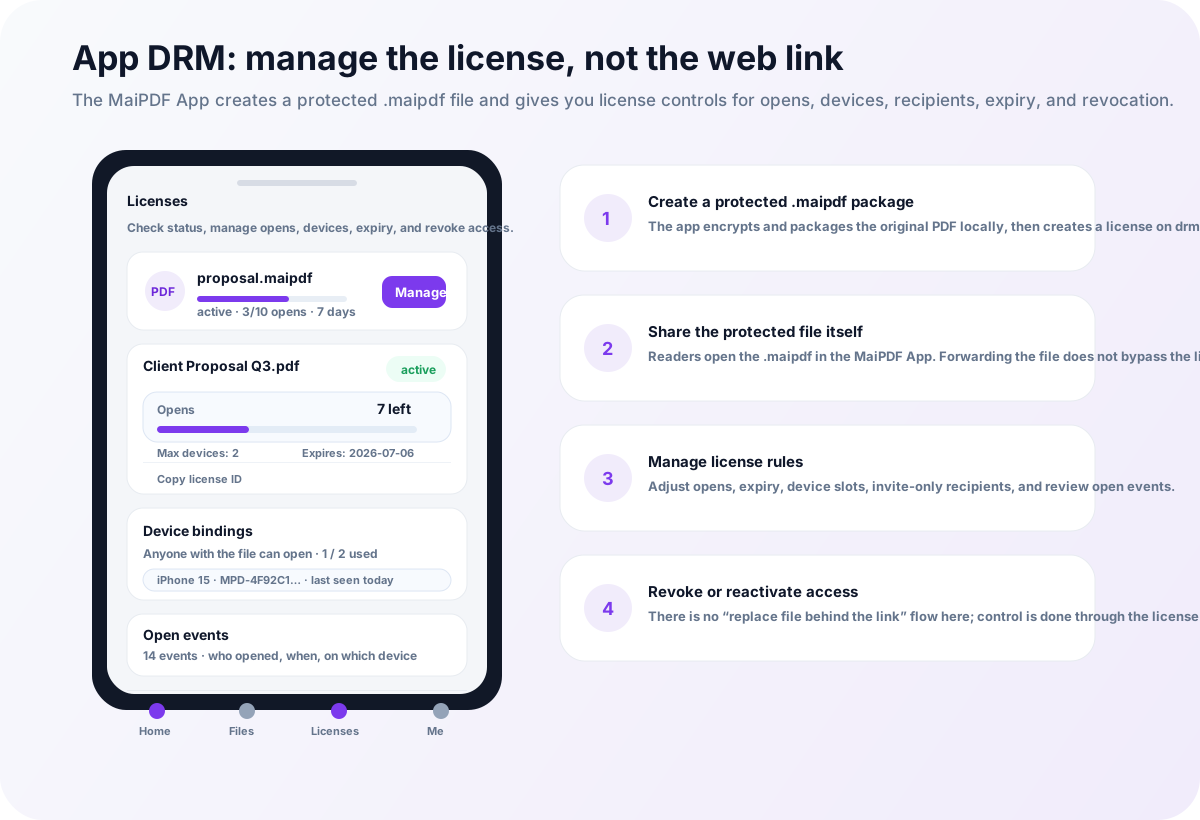
A controlled PDF workflow changes that. With MaiPDF, you can choose between Online Cloud Sharing and App DRM / .maipdf depending on how strongly you need to control access after the document has already been sent.
The key idea is simple:
Do not send an uncontrolled PDF when you may need to revoke access later.
What “revoke PDF access” means
Revoking access means the document owner can stop a reader from opening the document again, even after the link or protected file has already been shared.
Depending on the sharing method, revocation may work by disabling:
- a shared link
- a reader account
- a license record
- a device authorization
- a protected
.maipdffile unlock
Revocation does not erase screenshots or copies already made. It prevents future access through the controlled reading path.
Why normal PDF attachments cannot be revoked
A normal PDF attachment is just a file. If someone downloads it, forwards it, or saves it locally, the sender cannot reliably call it back.
You can ask the recipient to delete it, but technically:
- the file can be copied
- the email can be forwarded
- the PDF can be uploaded elsewhere
- the sender cannot know how many copies exist
- the sender cannot stop an already downloaded copy from opening
This is why revocation must be planned before sending the file.
Option 1: Revoke an online PDF sharing link
With MaiPDF online sharing, the reader opens a controlled browser link instead of receiving a raw PDF attachment.
This makes it possible to manage access after sharing. Depending on the file settings, the owner can use controls such as:
- disable the link
- set or shorten expiry
- limit the number of opens
- replace the PDF behind the same managed sharing workflow
- review access records
- use dynamic watermarks to discourage forwarding
Online sharing is best when the reader should open the PDF quickly without installing an app.
When online link revocation is enough
Use online sharing when:
- the document is useful but not extremely confidential
- you need a link or QR code
- the audience is broad or public-facing
- installation would reduce conversion
- you mainly need expiry, view limits, watermarking, and tracking
Examples include proposals, brochures, classroom materials, portfolios, reports, and client review files.
Option 2: Revoke App DRM / .maipdf access
For higher-risk documents, use MaiPDF App DRM.
In this workflow, the PDF is protected as a .maipdf file and opened inside the MaiPDF App. Access depends on license checks rather than just possession of the file.
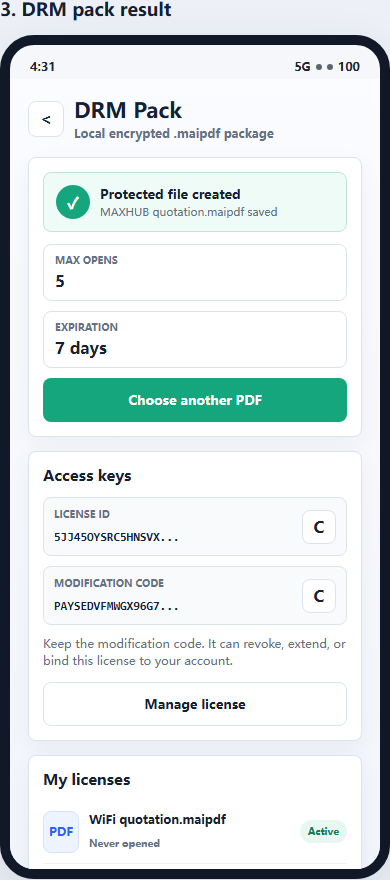
This means a forwarded .maipdf file is not automatically useful. The reader still needs permission to unlock it.
App DRM can support stronger post-send control:
- revoke a license
- restrict accounts
- limit devices
- set expiry
- apply open limits
- require the protected reader
- combine revocation with screenshot-aware controls
When App DRM revocation is better
Use App DRM when:
- the PDF contains paid content
- the file may be forwarded outside the intended group
- the document needs device binding
- screenshot risk matters
- the sender needs stronger post-distribution control
- the document is confidential enough to justify app installation
Examples include paid training PDFs, investor decks, board packets, legal drafts, internal manuals, and pre-release design documents.
Revocation vs expiration vs view limits
These controls are related but not identical.
| Control | What it does | Best use |
|---|---|---|
| Revocation | Stops future access manually | Emergency stop, changed permissions, suspicious sharing |
| Expiration | Stops access after a date or time | Temporary review, short-term campaigns, limited document windows |
| View limits | Stops access after a number of opens | Paid samples, limited previews, controlled reader sessions |
| Device binding | Limits where protected files can open | High-risk or paid content |
| Watermarking | Makes leaks easier to trace | Deterrence and investigation |
The strongest workflows combine several controls instead of relying on only one.
What revocation cannot do
Revocation is powerful, but it is not time travel.
It cannot undo:
- a screenshot already taken
- a photo taken with another phone
- information already copied manually
- a leaked file that was opened before revocation
That is why revocation should be paired with watermark tracing and, for high-risk PDFs, App DRM screenshot-aware reading.
Practical workflow: before sending a sensitive PDF
Before sending a PDF, ask these questions:
- Would I need to stop access later?
- Is the audience small and known?
- Would forwarding cause damage?
- Does screenshot risk matter?
- Can I reasonably ask readers to install an app?
If the answers are mostly no, use Online Cloud Sharing.
If the answers are mostly yes, use App DRM / .maipdf.
Recommended MaiPDF setup
For fast sharing
- create a controlled PDF link
- add view limits or expiry
- enable dynamic watermarking
- monitor access records
- disable access when needed
For strict control
Use MaiPDF App DRM:
- protect the PDF as
.maipdf - require the MaiPDF App protected reader
- set license and device rules
- revoke access if the file is forwarded or the deal changes
- combine with screenshot-aware controls and visible watermarks