What Is a .maipdf File? Protected PDF Files Explained
A .maipdf file is a protected PDF package designed to open inside the MaiPDF App instead of a normal browser tab or generic PDF reader.
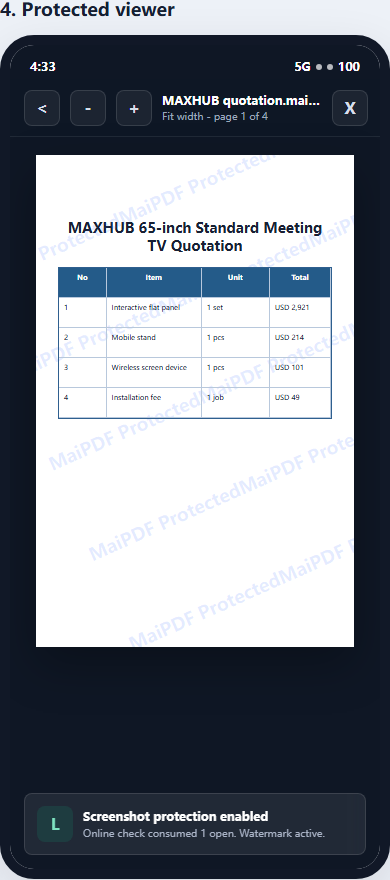
It is useful when a regular PDF link is too easy to save, forward, or screenshot. With a .maipdf workflow, the document owner can combine encryption, unlock checks, device rules, revocation, watermark tracing, and app-level screen-capture controls.
Short version: use a normal MaiPDF online link when sharing speed matters. Use a
.maipdffile when stronger reader control matters.
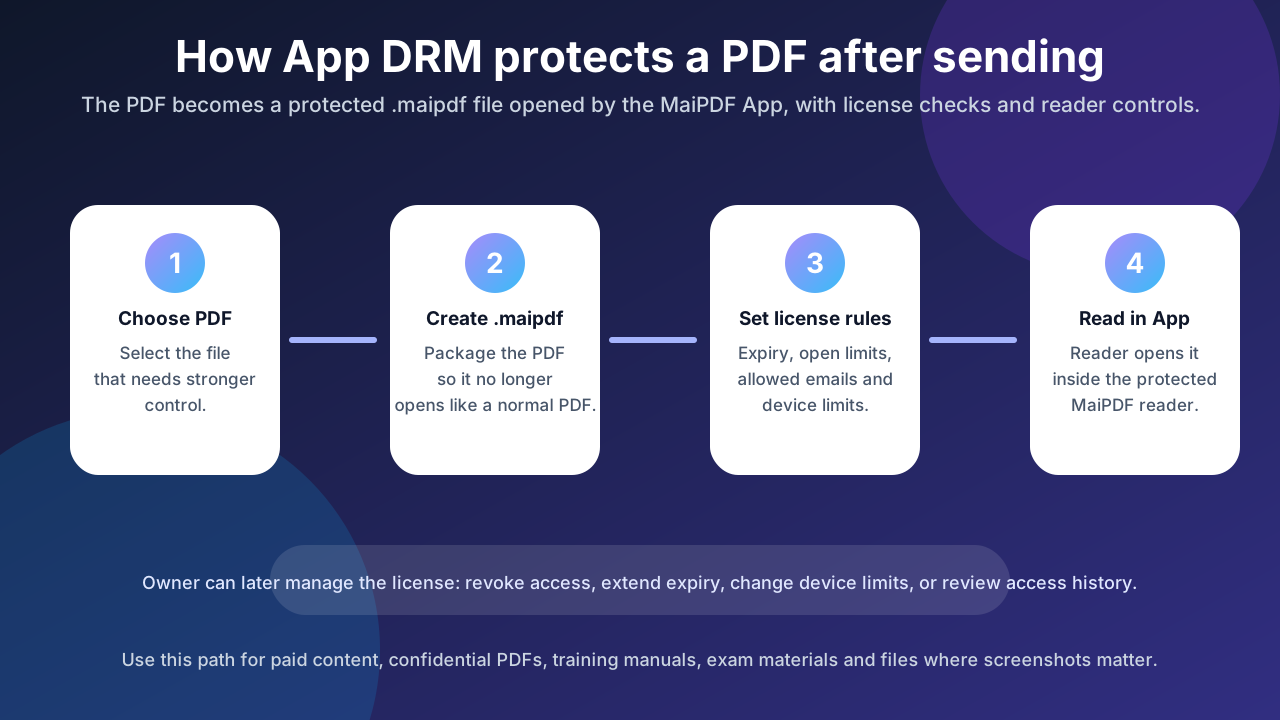
What a .maipdf file contains
A .maipdf file is not just a renamed PDF. It is a protected package that can include:
- encrypted PDF content
- license or unlock information
- document identity and trace metadata
- watermark configuration
- access rules such as expiry or view limits
- rules that require the MaiPDF App to open the document
The reader does not open it in Chrome, Safari, Preview, Adobe Reader, or another generic PDF viewer. They open it with the MaiPDF protected reader.
.maipdf vs normal PDF
| Feature | Normal PDF | .maipdf protected file |
|---|---|---|
| Opens in any PDF reader | Yes | No, opens in MaiPDF App |
| Easy to forward | Yes | File can be forwarded, but access still depends on unlock rules |
| Device binding | No | Yes, depending on the license policy |
| Screenshot controls | No | Available through the app where the OS allows it |
| Remote revoke | No | Yes, when access is checked through the MaiPDF license system |
| Watermark tracing | Static only unless edited manually | Dynamic / trace-oriented watermarking can be applied |
A normal PDF is convenient, but once sent it is difficult to control. A .maipdf file is less universal but gives the owner a stronger control layer.
.maipdf vs MaiPDF online sharing link
MaiPDF has two different sharing paths:
- Online PDF sharing through maipdf.com
- App DRM /
.maipdfsharing through drm.maipdf.com
They solve different problems.
| Need | Better path |
|---|---|
| Send a link quickly | Online sharing |
| Let people scan a QR code and read in a browser | Online sharing |
| Track opens and add dynamic watermarks | Online sharing or App DRM |
| Reduce screenshot risk | App DRM / .maipdf |
| Bind access to devices | App DRM / .maipdf |
| Revoke access after a file was sent | App DRM / .maipdf |
| Avoid asking readers to install anything | Online sharing |
Browser links are fast and easy. .maipdf files are stronger but require the app.
Why browsers cannot replace .maipdf App DRM
A browser page can hide the original file URL, add a watermark, limit views, or make downloads harder. But it cannot fully control the operating system.
That means a browser page cannot reliably stop:
- OS screenshot shortcuts
- screen recording tools
- another app capturing the window
- a second phone recording the screen
The MaiPDF App has a better security position because the protected reader runs closer to the device environment. This is why .maipdf is the right path for screenshot-aware workflows.
No software can stop someone filming the screen with another camera, so the honest goal is not “perfect leak prevention.” The goal is to combine screenshot controls, visible identity watermarks, device rules, and revocation so leaking becomes harder and easier to trace.
How a reader opens a .maipdf file
The typical reader flow is:
- The owner creates or receives a
.maipdfprotected file. - The reader installs the MaiPDF App for their platform.
- The reader opens the
.maipdffile inside the app. - The app checks whether the reader is allowed to unlock the file.
- If approved, the file opens with the configured controls.
Depending on the file policy, the reader may need to sign in, use an approved account, or open it on an allowed device.
When should you use .maipdf?
Use .maipdf when the document is important enough that a normal link is not enough.
Good examples:
- paid training materials
- confidential board reports
- private investor decks
- legal drafts and negotiation documents
- exam prep materials
- internal SOPs or manuals
- design files and high-value proposals
For a public brochure or casual PDF handout, a normal MaiPDF online link is usually simpler.
Practical security boundary
A .maipdf file improves control, but it is not magic. Set expectations clearly:
- It can restrict how the protected file opens.
- It can support device binding and revocation.
- It can reduce screenshot and recording risk through app controls.
- It can add visible watermarks that make leaks traceable.
- It cannot stop a person from photographing the screen with a separate camera.
For many businesses, that combination is enough to move from “PDF sent and lost forever” to “PDF access is controlled and traceable.”
Next step
If you only need fast browser sharing, start with MaiPDF online sharing.
If you need protected files, screenshot-aware reading, device binding, and revocation, start with MaiPDF App DRM.