Free PDF Screenshot Protection Software: What Actually Works
If you are looking for free PDF screenshot protection software, here is the direct answer:
A normal PDF file, a PDF password, and a browser PDF viewer cannot truly stop screenshots. If the document opens in a normal browser or a normal PDF reader, the operating system can usually still capture the screen.
To reduce screenshots in a serious way, you need a protected reader — an app that opens the document inside a controlled viewing environment and uses platform-level screen-capture controls where the operating system supports them.
That is what the MaiPDF App is for.
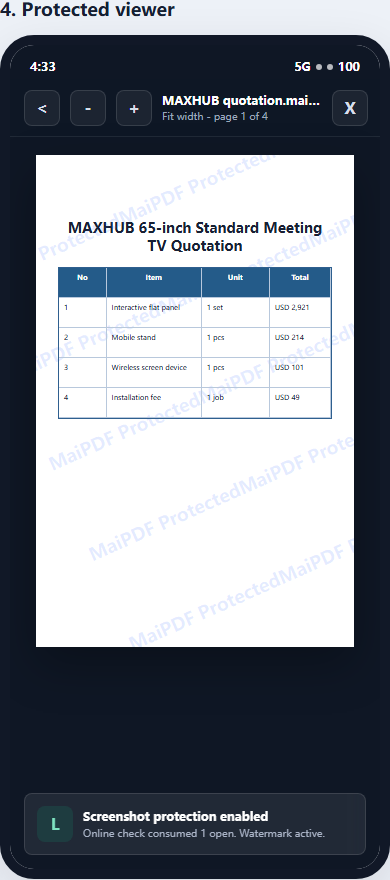
With MaiPDF, you can turn a PDF into a protected .maipdf file and require readers to open it inside the MaiPDF protected reader. This is the path to use when screenshot risk actually matters.
The simple rule
Use this rule before choosing a tool:
| What you use | Can it truly block screenshots? |
|---|---|
| Normal PDF password | No |
| Adobe Reader password permissions | No, not reliably |
| Google Drive preview | No |
| Dropbox preview | No |
| Browser PDF viewer | No |
| Online PDF link | No, browser-level only |
| Protected native reader | Stronger screenshot control on supported platforms |
| Another phone pointed at the screen | No software can stop this |
So the real question is not “Can any software make screenshots impossible?”
The real question is:
Can I make screenshots harder, reduce casual leakage, revoke access later, bind access to devices, and trace leaks if they happen?
For high-value PDFs, that is the practical goal.
Why browser tools cannot truly prevent screenshots
Many online PDF tools say they can “disable download,” “disable print,” or “prevent copy.” These controls are useful, but they are not the same as screenshot protection.
A browser page can usually:
- hide the download button
- disable right-click
- block text selection
- remove print controls
- show a watermark
- expire a link
- count opens
But a browser page normally cannot fully control the operating system’s screenshot function.
That means browser-based PDF sharing is good for convenience and lightweight control, but it is not the right answer if your main search is:
- prevent PDF screenshots
- stop students from screenshotting course PDFs
- free PDF DRM software
- protected PDF reader
- PDF screenshot blocker
- lock PDF from screen capture
For those searches, you should look at App DRM.
The free tool path: MaiPDF App + .maipdf
For screenshot-heavy use cases, the important difference is not “free versus paid PDF password.” It is browser viewer versus protected reader.
A browser viewer can make sharing easier and add useful controls. A protected reader changes where the document is opened, checks whether the reader is still allowed to open it, and can apply stronger screen-capture controls on supported platforms.
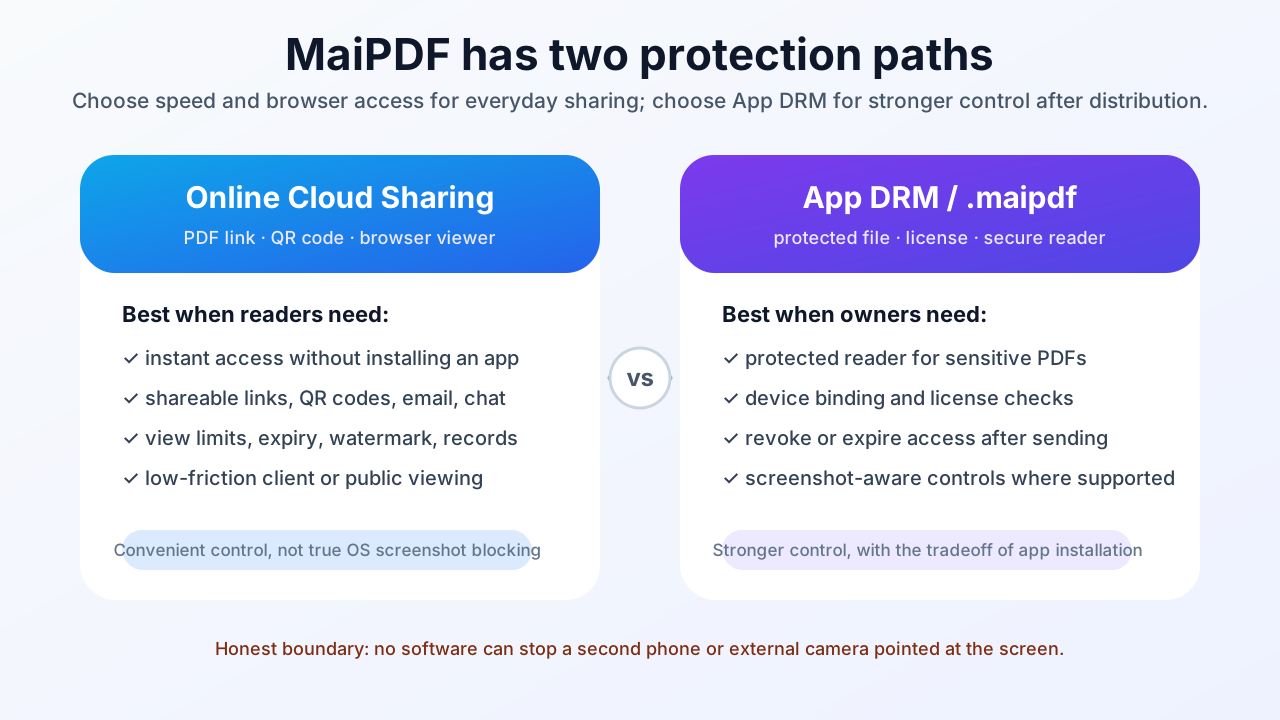
MaiPDF has two different sharing paths:
- Online Cloud Sharing — upload a PDF and share a controlled browser link or QR code.
- App DRM /
.maipdf— package the PDF into a protected file opened inside the MaiPDF App.
If your goal is real screenshot protection, choose the second path.
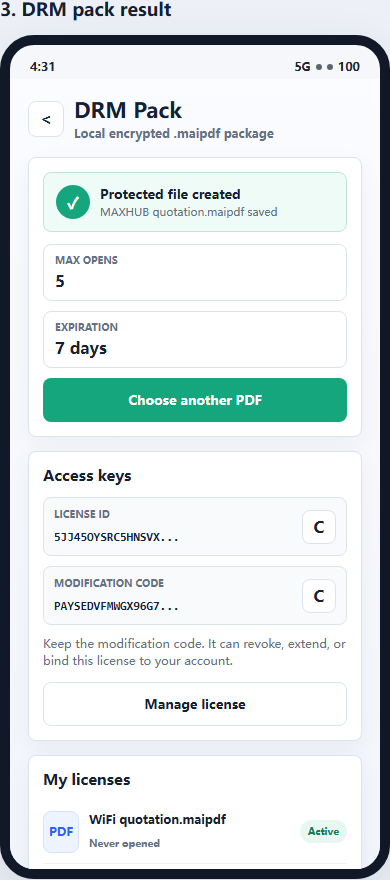
The App DRM workflow is:
- Choose the PDF you want to protect.
- Package it as a protected
.maipdffile. - Set access rules such as expiry, device limits, and license controls.
- Send the
.maipdffile to the reader. - The reader opens it inside the MaiPDF App protected reader.
- If access should end, revoke or expire the license.
What the protected reader can help with
A protected reader can do things that a normal browser page cannot reliably do:
- reduce screenshot and screen-recording risk on supported platforms
- keep the PDF inside a controlled reader
- require unlock checks before reading
- bind access to approved devices
- revoke access after sending
- expire access after a course, contract, or review period
- show visible watermarks to discourage reposting
- make casual forwarding less useful
This does not make copying impossible. It changes the risk model from “anyone with the file can open it anywhere” to “the file needs the protected reader and a valid license.”
When free screenshot protection is enough
A free protected-reader workflow is useful for:
- paid course PDFs
- training manuals
- exam-prep materials
- consulting frameworks
- confidential client PDFs
- internal playbooks
- partner manuals
- premium templates
- files where refund abuse or forwarding is a problem
If you only need to share a public brochure, a normal link is easier. If you need to protect paid or sensitive content, use App DRM.
What no free tool can promise
Be careful with any tool that promises perfect screenshot prevention.
No PDF tool can stop every possible leak because:
- a reader can photograph the screen with another phone
- a reader can manually rewrite or summarize the content
- platform screenshot controls vary by operating system
- very determined attackers may use external capture hardware
A trustworthy PDF screenshot protection tool should be honest about this.
The useful promise is more practical:
- stop easy screenshots where supported
- discourage casual sharing
- make forwarded files less useful
- keep access revocable
- bind access to devices
- add visible accountability through watermarks
Browser link or App DRM?
Use this quick decision table:
| Need | Best MaiPDF path |
|---|---|
| Send a PDF link quickly | Online Cloud Sharing |
| Share by QR code | Online Cloud Sharing |
| Expire a browser link | Online Cloud Sharing |
| Disable download in browser | Online Cloud Sharing |
| Add watermark to a browser viewer | Online Cloud Sharing |
| Protect a paid PDF workbook | App DRM / .maipdf |
| Reduce screenshots | App DRM / .maipdf |
| Bind reading to devices | App DRM / .maipdf |
| Revoke a file after refund | App DRM / .maipdf |
| Protect training or exam material | App DRM / .maipdf |
The direct recommendation
If you searched for free PDF screenshot protection software, do not start with a browser PDF viewer.
Start with a protected reader.
Use MaiPDF Online Cloud Sharing when you want fast links, QR codes, expiry, view limits, watermarks, and access tracking.
Use the MaiPDF App and .maipdf when you actually care about screenshot-aware reading, device binding, revocation, and stronger control after the file leaves your computer.