How to Revoke Course PDF Access After a Refund
Refunds are normal in online courses. The problem is what happens to the PDF after the refund.
If the buyer received a normal PDF attachment or download link, they may keep using the workbook, study guide, or exam-prep material after the payment is reversed. The creator has no reliable way to call back a raw file.
A controlled PDF workflow solves a different problem:
The buyer may have received access, but the creator can still stop future access when the license should end.
MaiPDF supports this through Online Cloud Sharing and App DRM / .maipdf protected files.
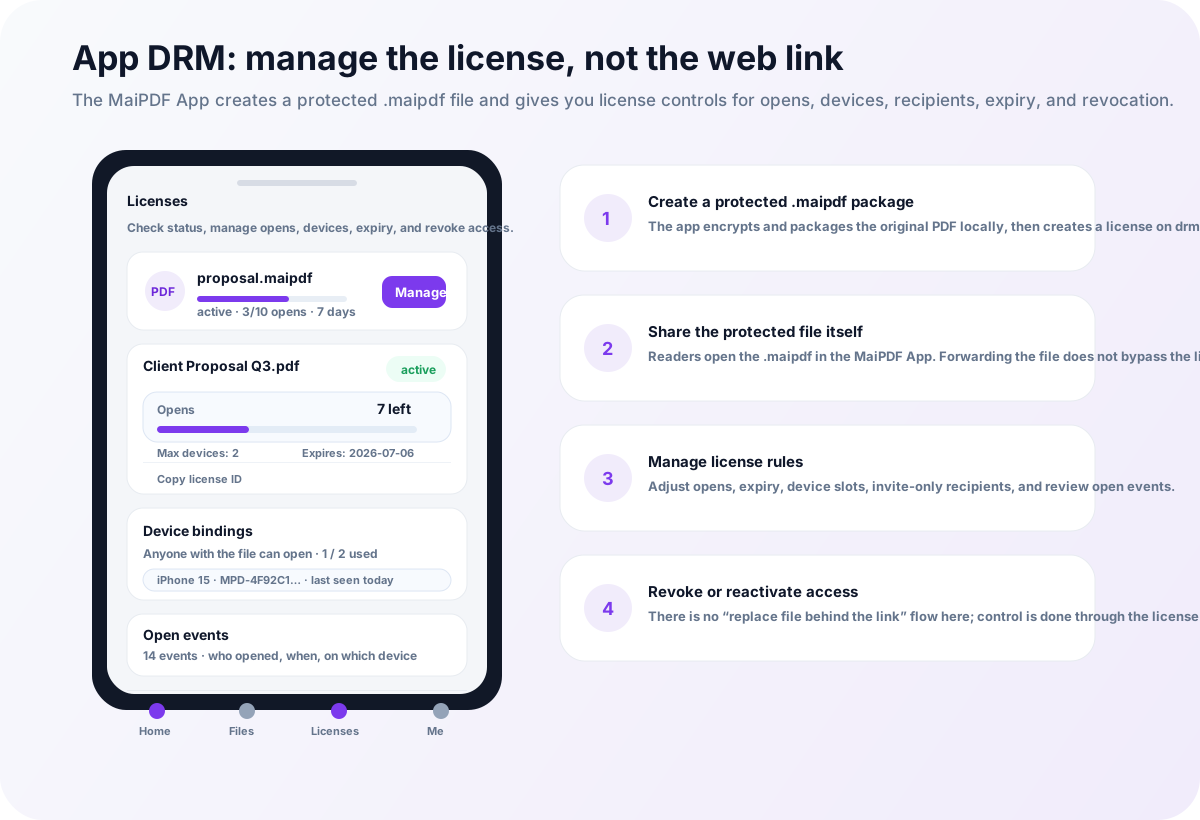
Why refunds are hard with normal PDFs
Normal PDF delivery is usually final.
If the file was sent by email, checkout download, cloud storage, LMS upload, or chat attachment, the buyer may already have a local copy.
After a refund, the creator can ask the buyer to delete the file, but technically:
- the file can remain on the buyer’s device
- the file can be forwarded before the refund
- the password can be shared
- screenshots may already exist
- there may be no access record
- there may be no way to stop future opening
This is why refund control must be planned before the PDF is delivered.
Use controlled access instead of raw downloads
The safer rule is simple:
If refund revocation matters, do not deliver the high-value PDF as a raw file.
Use one of these paths instead:
| Material | Better path |
|---|---|
| Free sample | Online Cloud Sharing |
| Low-risk handout | Online link with expiry |
| Paid workbook | App DRM / .maipdf |
| Exam-prep PDF | App DRM / .maipdf |
| Certification guide | App DRM / .maipdf |
| Corporate training manual | App DRM / .maipdf |
Online links can be disabled. App DRM licenses can be revoked.
Revoking an online PDF link
With MaiPDF Online Cloud Sharing, the creator sends a controlled browser link instead of a raw PDF.
For refund handling, useful controls include:
- disabling the link
- shortening expiry
- limiting opens
- checking access records
- replacing or removing the shared document
- watermarking pages to discourage leaks
This works best for lightweight course materials and low-friction delivery.
Revoking App DRM / .maipdf access
For paid course workbooks and exam-prep files, use MaiPDF App DRM.
In this workflow, the PDF is protected as a .maipdf file and opened inside the MaiPDF App. Access depends on license permission, not just file possession.
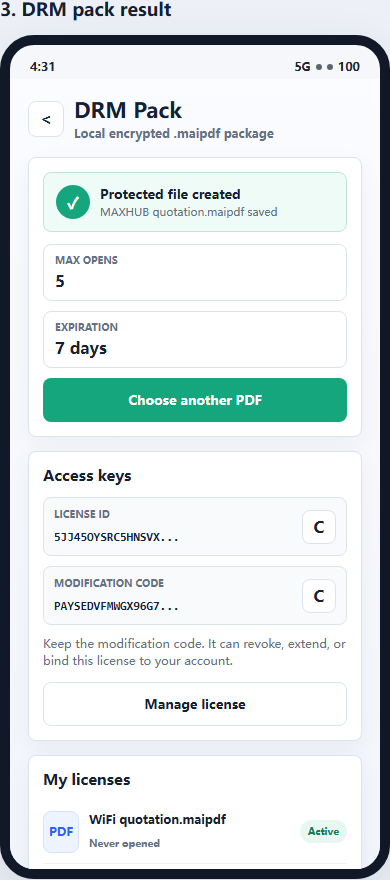
After a refund or chargeback, the creator can revoke the license or tighten access rules. A forwarded .maipdf file is not automatically useful to another person without authorization.
App DRM can support:
- license revocation
- device limits
- expiry
- open limits
- protected reader access
- watermarking
- screenshot-aware controls where supported
Refund workflow for course creators
A practical refund workflow looks like this:
- Sell the course or workbook.
- Deliver samples through Online Cloud Sharing.
- Deliver paid core PDFs as
.maipdfwhen control matters. - Add watermarking and device limits.
- If a refund or chargeback happens, revoke the link or license.
- Check access records for unusual usage.
- Reissue access only if the refund is reversed or the buyer repurchases.
The key is to make revocation a normal part of the sales workflow, not an emergency workaround.
What revocation cannot undo
Revocation is not time travel.
It cannot erase:
- screenshots already taken
- external phone photos
- notes manually copied from the material
- files already extracted from an uncontrolled raw PDF delivery
That is why revocation should be paired with watermarking, device binding, expiry, and protected reading for high-value course PDFs.
Quick recommendation
If the PDF is a sample or low-risk handout, use MaiPDF Online Cloud Sharing so access can expire or be disabled.
If the PDF is a paid workbook, exam-prep guide, certification file, or training manual, use MaiPDF App DRM and distribute a protected .maipdf file with license revocation.
For related workflows, read How to Sell PDF Workbooks Without Losing Control, PDF DRM for Online Courses, and How to Revoke Access to a PDF After Sending.