How to Share Paid Training PDFs Securely
Paid training PDFs are different from ordinary handouts. A brochure can be forwarded without much damage. A paid workbook, exam pack, coaching manual, or internal training file may become the product itself.
If the PDF is sent as a normal attachment, the buyer can usually download it, forward it, upload it to a group chat, or keep using it after a refund. A secure delivery workflow should control access before and after the file is shared.
MaiPDF gives course creators two useful paths. For the broader course-platform view, see PDF DRM for Online Courses.
- Online Cloud Sharing for fast browser-based delivery with links, QR codes, view limits, expiry, and watermarks.
- App DRM /
.maipdffor stronger protection with a controlled reader, device binding, revocation, and screenshot-aware reading.
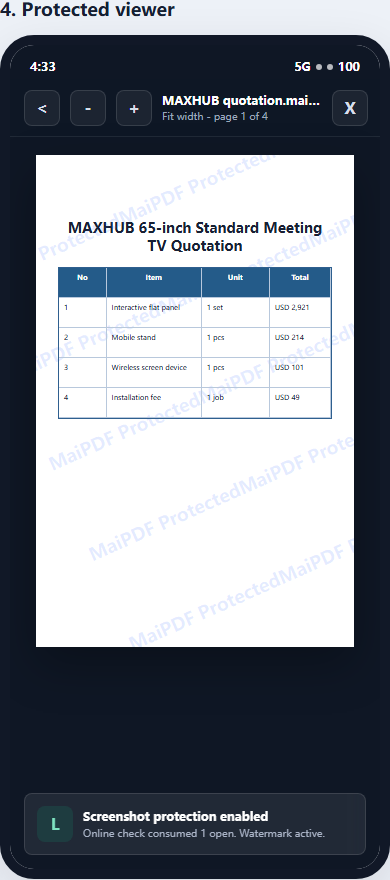
The problem with selling normal PDF files
A normal PDF file is easy to deliver, but hard to control.
Common risks include:
- one student forwards the file to many others
- the PDF is uploaded to a Telegram, Discord, WhatsApp, or WeChat group
- a refunded buyer keeps the file
- someone resells the workbook as their own material
- a company distributes one purchased copy to an entire team
- screenshots are shared without attribution
Password protection does not solve this. If every buyer receives the same password, the password can be shared with the file. If the PDF is downloaded, the seller has little control over what happens next.
Decide the security level first
Not every course PDF needs the same protection.
Use this quick rule:
| Training material | Better MaiPDF path |
|---|---|
| Free lead magnet | Online Cloud Sharing |
| Public class handout | Online Cloud Sharing |
| Preview sample chapter | Online Cloud Sharing with view limits |
| Paid workbook | Usually App DRM / .maipdf |
| Certification material | App DRM / .maipdf |
| Internal corporate training manual | App DRM / .maipdf |
| High-value exam prep content | App DRM / .maipdf |
Online sharing is best when convenience matters most. App DRM is better when the PDF itself is valuable and should not behave like a normal downloadable file.
Option 1: Share paid PDFs with controlled online links
With MaiPDF Online Cloud Sharing, you upload the PDF and send readers a managed link or QR code instead of a raw file attachment.
This is useful for:
- sample lessons
- short paid handouts
- workshop materials
- time-limited reading windows
- large audiences where installing an app would reduce completion
Useful controls include:
- link expiration
- open limits
- dynamic watermarking
- access records
- read tracking
- QR code delivery
- easier link management than email attachments
For lightweight paid content, this is often enough. The buyer gets a smooth reading experience, while the seller keeps more control than with a normal PDF download.
Where online sharing is weaker
A browser cannot fully control the operating system. It can discourage copying and add watermarks, but it cannot reliably block every screenshot shortcut, screen recorder, browser capture tool, or photo taken with another phone.
If screenshot risk and forwarding risk are serious, use App DRM.
Option 2: Protect paid PDFs as .maipdf files
For higher-value training material, use MaiPDF App DRM.
In this workflow, the creator protects the PDF as a .maipdf file. Readers open it inside the MaiPDF App instead of a normal browser or generic PDF reader.
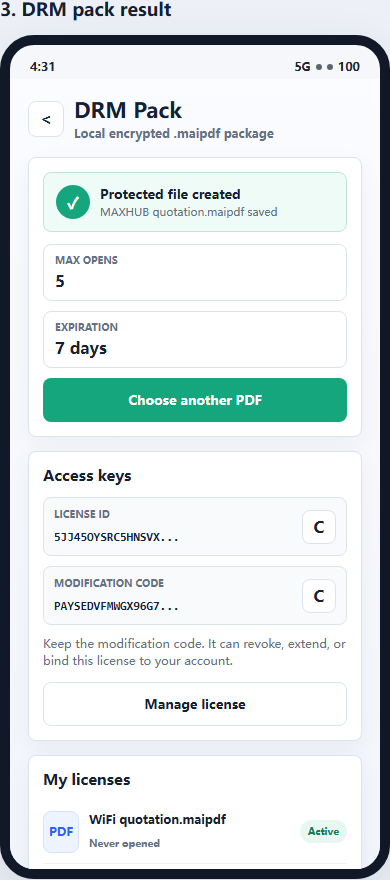
This changes the security model:
- possessing the file is not enough
- access can depend on a license check
- the seller can restrict approved devices
- access can expire
- access can be revoked
- the reader uses a protected viewer
- screenshot-aware controls can be applied where supported by the platform
For paid courses, this is the more serious path because the seller is no longer relying only on trust after delivery.
Practical workflow for a paid course PDF
A simple paid training workflow looks like this:
- Prepare the PDF workbook, lesson notes, or exam material.
- Decide whether it should be a browser link or a protected
.maipdffile. - If it is lightweight or promotional, use Online Cloud Sharing.
- If it is paid core content, protect it with App DRM.
- Set expiry, view limits, or device limits according to the course policy.
- Add visible or dynamic watermarking so leaks are easier to trace.
- Send the buyer the access instructions.
- If a refund, abuse report, or suspicious sharing happens, revoke or tighten access.
The key is to make the access policy part of the delivery process, not an emergency fix after the PDF has already leaked.
Recommended controls for paid training materials
| Control | Why it matters for paid PDFs |
|---|---|
| Expiry | Stops access after the course window ends |
| View limits | Useful for previews, samples, or limited-access bundles |
| Device binding | Reduces account sharing and one-license-many-users abuse |
| Revocation | Lets the seller stop future access after refunds or abuse |
| Watermarking | Makes screenshots and leaks easier to trace |
| Protected reader | Reduces casual copying compared with ordinary PDF readers |
| Screenshot-aware mode | Helps reduce screen capture risk where the platform supports it |
The strongest setup combines several controls. For example, a paid exam-prep PDF may use .maipdf, device limits, expiry, watermarking, and revocation together.
Example setups
Small paid workshop
Use Online Cloud Sharing if the material is not highly sensitive:
- send one controlled link after payment
- set expiry for the workshop period
- add dynamic watermarking
- track opens
- disable the link after the event if needed
This keeps the experience simple for students.
Premium course workbook
Use App DRM / .maipdf:
- protect the workbook as a
.maipdffile - require the MaiPDF App for reading
- bind access to approved devices
- add watermarking
- revoke access after refunds or license abuse
This is better when the workbook is part of what people are paying for.
Corporate training manual
Use App DRM when one purchase should not become unlimited internal distribution:
- create licenses for approved readers or teams
- limit devices
- set an end date for access
- revoke access when an employee leaves or a training contract ends
- use watermarks to discourage screenshots and forwarding
What no PDF security tool can promise
No software can stop every possible leak.
A determined person can still photograph a screen with another phone, retype information, or describe the content to someone else. Secure PDF delivery is about reducing easy abuse, keeping control after distribution, and making leaks more traceable.
For paid training PDFs, that is often the difference between a file that spreads freely and a controlled learning asset.
Quick recommendation
Use Online Cloud Sharing when you need fast delivery, simple access, QR codes, expiry, and tracking.
Use App DRM / .maipdf when the PDF is paid, sensitive, easy to resell, or should remain controlled after the buyer receives it.
For course creators, coaches, educators, and training companies, the safer default for high-value paid PDFs is:
Do not send the raw PDF. Send controlled access.
If student forwarding is your main concern, also read How to Prevent Students from Sharing Course PDFs. For the broader online-course DRM model, read PDF DRM for Online Courses. If the product is a standalone workbook, read How to Sell PDF Workbooks Without Losing Control.
Start with MaiPDF online sharing for lightweight delivery, or use MaiPDF App DRM when you need protected .maipdf files, device binding, revocation, and screenshot-aware reading.