Facebook PDF Sharing: Post Document Links That Look Professional
Facebook PDF Sharing: Post Document Links That Look Professional
Facebook is perfect for sharing information, but uploading PDF files directly isn’t always the best approach. MaiPDF lets you convert PDFs into clean, shareable links that work beautifully on Facebook, providing better engagement and a more professional appearance.
Why PDF Links Work Better on Facebook
Cleaner Posts: Links create clean, professional-looking posts instead of cluttered file attachments.
Better Mobile Experience: Most Facebook users browse on mobile - PDF links provide optimized mobile viewing.
Enhanced Engagement: Links are more likely to be clicked and shared than file downloads.
Professional Appearance: Clean URLs enhance your credibility on Facebook business pages.
No Download Required: Friends and followers can view documents instantly without downloading files.
Perfect for Facebook Business Pages
Product Catalogs: Share detailed product brochures or catalogs that customers can access easily.
Service Menus: Post restaurant menus, service price lists, or treatment offerings.
Event Programs: Share detailed event schedules, speaker information, or conference programs.
Educational Content: Provide downloadable guides, tutorials, or informational resources.
Company Updates: Share annual reports, newsletters, or company announcements professionally.
How to Share PDFs on Facebook
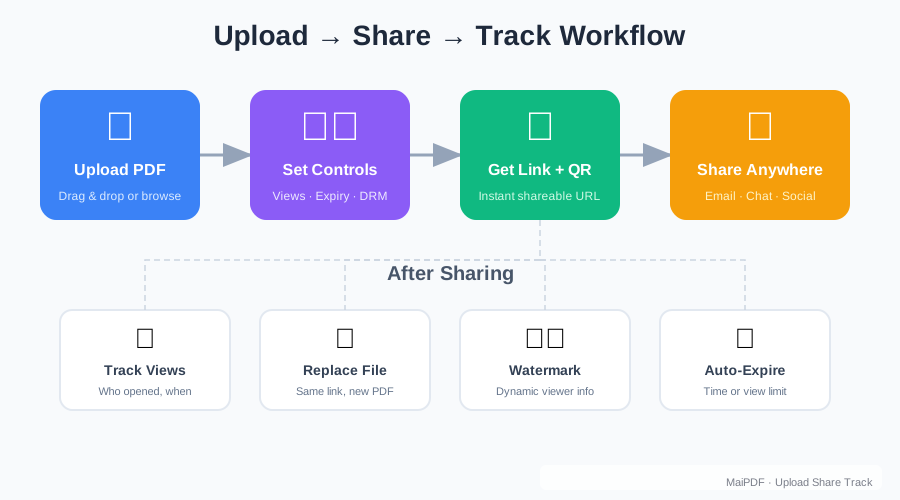
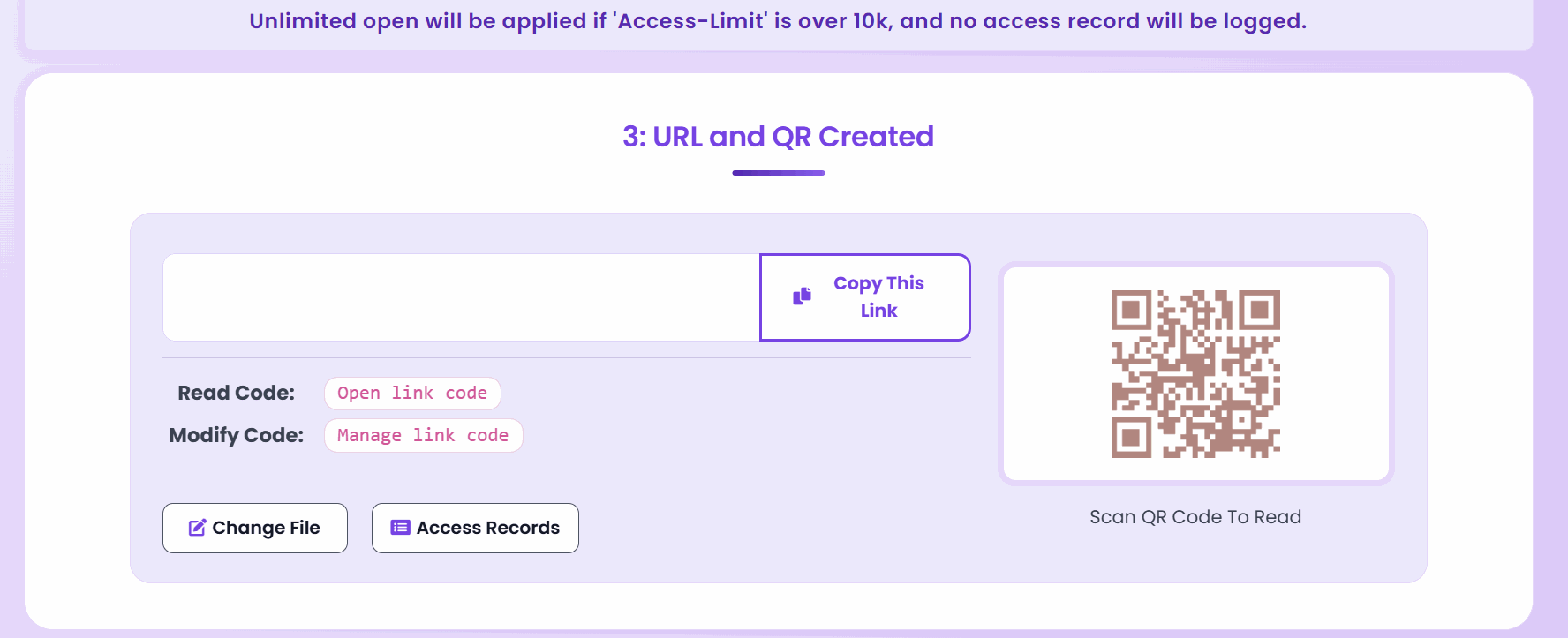
Step 1: Convert to Link - Upload your PDF to MaiPDF and get a professional sharing URL.
Step 2: Create Your Post - Write engaging text that introduces your document.
Step 3: Add the Link - Paste your PDF link into the Facebook post.
Step 4: Publish and Engage - Share your post and respond to comments and questions.
Optimized for Facebook’s Mobile Users
Mobile-First Design: Over 98% of Facebook users access the platform on mobile devices - PDF links provide perfect mobile viewing.
Fast Loading: Documents load quickly even on cellular connections.
Touch-Friendly: Smooth scrolling and zoom controls designed for touchscreen interaction.
No App Switching: Documents open in the mobile browser without leaving Facebook.
Share-Friendly: Easy to share from mobile devices to other social platforms.
Control Your Facebook Document Sharing
View-Only Options: Share documents that can be read but not downloaded from Facebook.
Download Control: Allow or prevent file downloads based on your sharing goals.
Access Tracking: Monitor how many people click your Facebook-shared links.
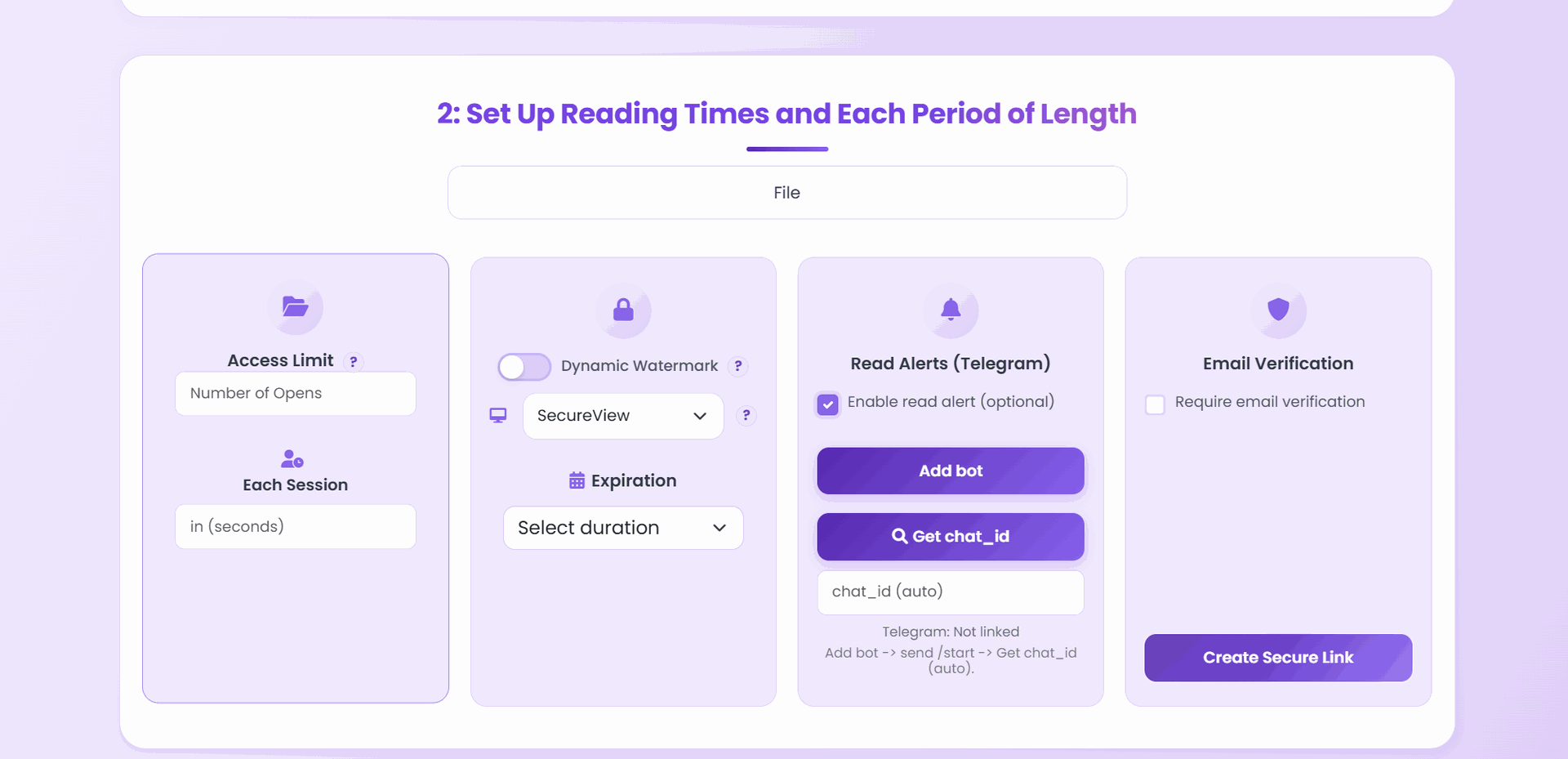
Time-Based Sharing: Set expiration dates for time-sensitive Facebook posts.
Usage Analytics: Understand engagement patterns from your Facebook audience.
Facebook Group Sharing
Educational Groups: Share course materials, study guides, or educational resources with learning communities.
Professional Groups: Distribute industry reports, whitepapers, or professional development materials.
Hobby Groups: Share instructions, guides, or reference materials related to group interests.
Local Community Groups: Post event information, local news, or community resources.
Business Networking: Share company profiles, service offerings, or professional portfolios.
Enhanced Facebook Engagement
Higher Click Rates: Clean, professional links often get more clicks than direct file uploads.
Better Comments: Easier access leads to more meaningful discussion in comments.
Increased Shares: Links are more likely to be shared to other Facebook pages and groups.
Professional Credibility: Well-presented links enhance your reputation on Facebook business pages.
Cross-Platform Sharing: Facebook users can easily share your links to other social media platforms.

Facebook Business Page Benefits
Professional Presentation: Clean links make your business page look more professional and trustworthy.
Customer Service: Share user manuals, troubleshooting guides, or product information quickly.
Marketing Materials: Distribute brochures, catalogs, or promotional content that customers can access easily.
Event Promotion: Share detailed event information, schedules, or registration forms.
Educational Content: Provide valuable resources that establish your expertise in your industry.
Privacy and Security on Facebook
Controlled Access: You decide who can view or download your documents, not Facebook’s algorithms.
Secure Links: Each PDF gets a unique URL that maintains security even when shared publicly.
No Facebook Storage: Documents aren’t stored on Facebook’s servers, maintaining your data privacy.
Direct Control: Disable links anytime if you need to revoke access from Facebook posts.
Facebook Advertising Integration
Lead Magnets: Use PDF links in Facebook ads to provide valuable content in exchange for contact information.
Product Information: Include detailed product guides or catalogs in Facebook ad campaigns.
Educational Content: Share helpful guides or tutorials that demonstrate your expertise.
Event Promotion: Link to detailed event information or registration forms in Facebook event posts.
Managing Facebook PDF Shares
Real-Time Analytics: Monitor how your Facebook-shared documents are performing.
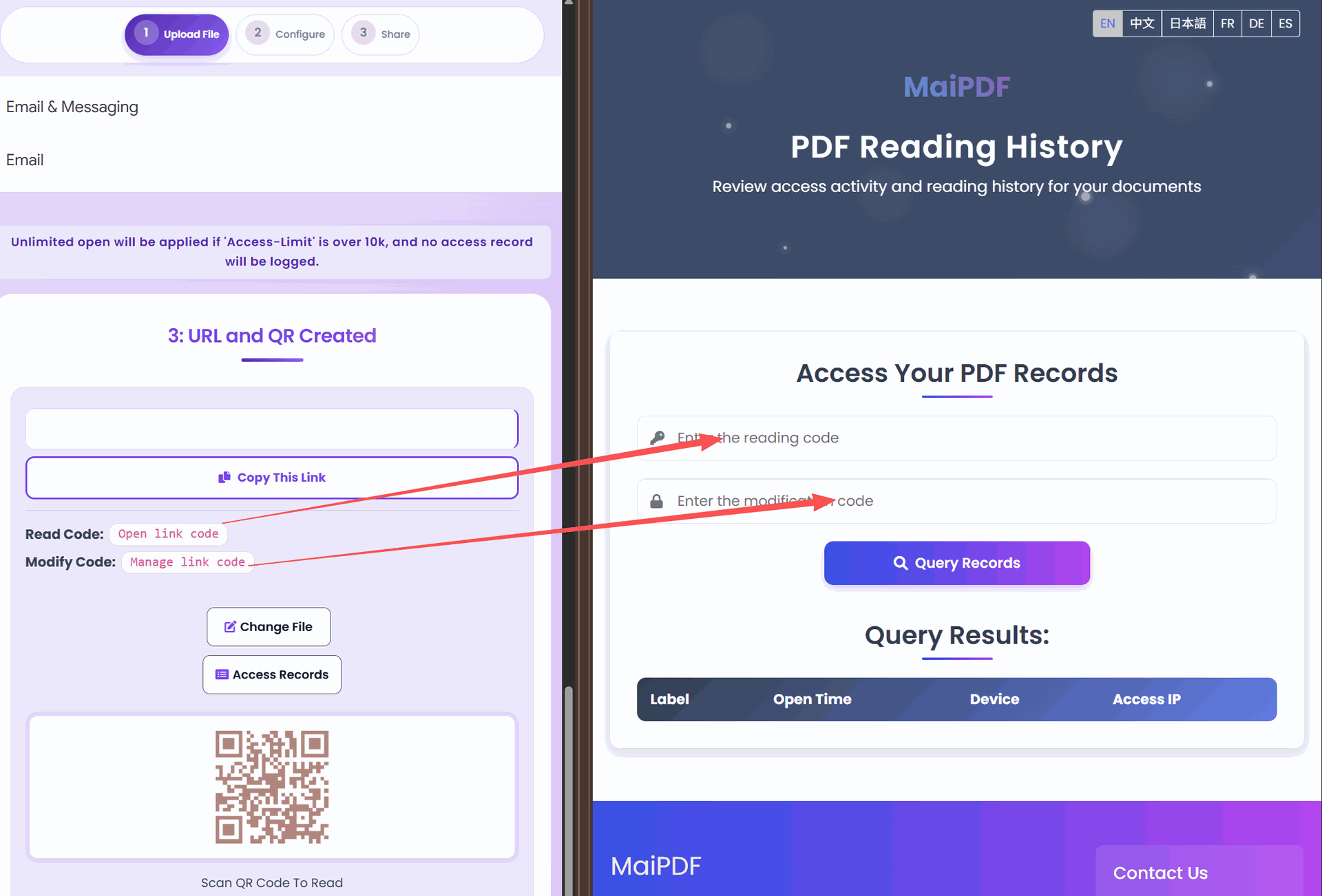
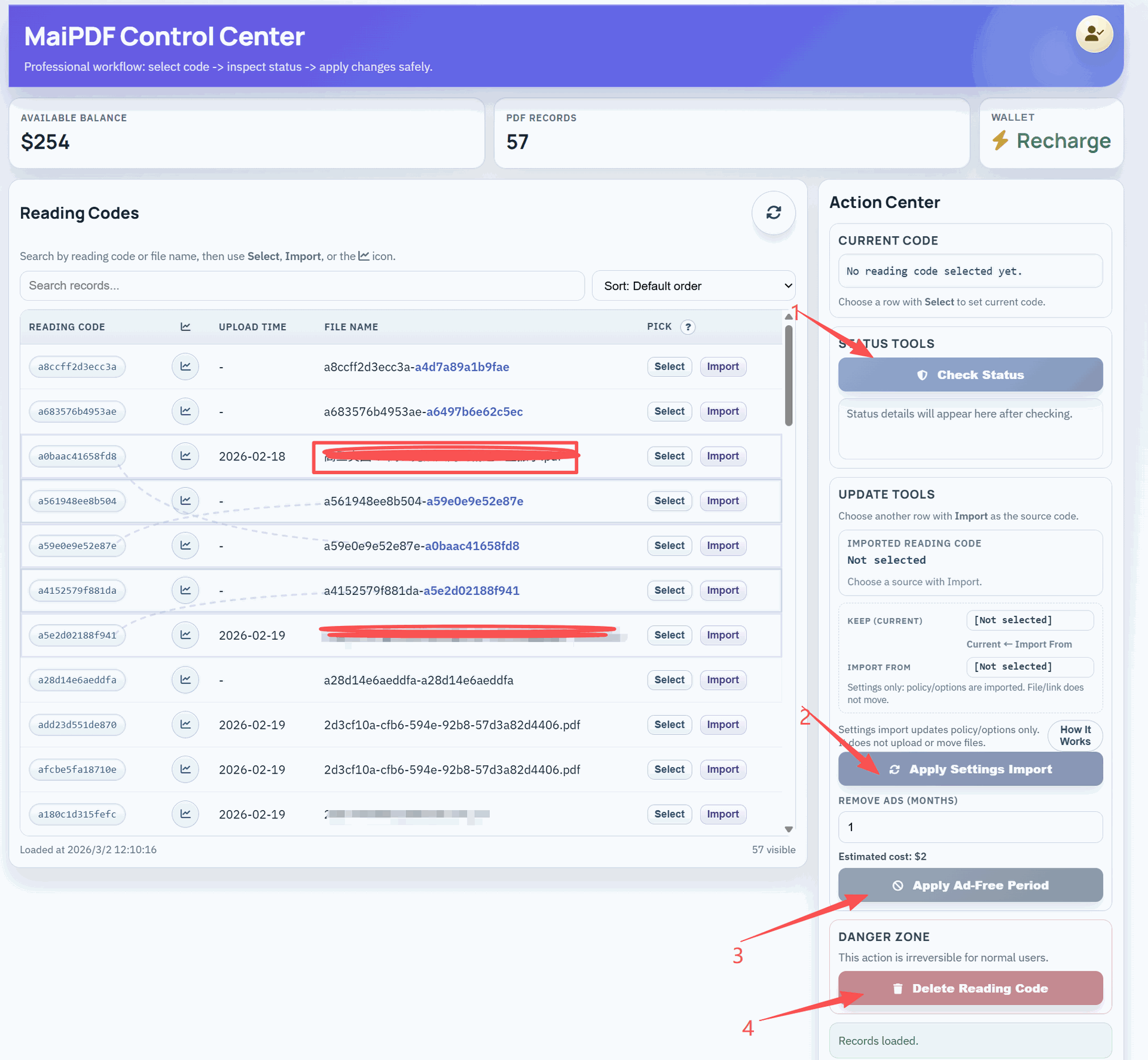
Settings Updates: Change document permissions even after posting on Facebook.
Engagement Tracking: See which Facebook posts drive the most document views.
Best Practices for Facebook PDF Sharing
Compelling Descriptions: Write engaging post text that explains the value of your document.
Visual Appeal: Use relevant images or graphics alongside your PDF links.
Call to Action: Include clear instructions encouraging people to click and view.
Timing: Post when your Facebook audience is most active for better engagement.
Respond Quickly: Engage with comments and questions about your shared documents.
Facebook Story Integration
Quick Access: Share PDF links in Facebook Stories for 24-hour promotional content.
QR Codes: Include QR codes in Story posts for easy mobile access to your documents.
Swipe-Up Features: Use PDF links as destinations for Story swipe-up actions (if available).
Behind-the-Scenes: Share work-in-progress documents or exclusive content through Stories.
Cross-Platform Social Sharing
Multi-Platform Strategy: Share the same PDF link across Facebook, Instagram, Twitter, and LinkedIn.
Consistent Branding: Professional links maintain consistent appearance across all social platforms.
Easy Repurposing: Use one PDF link for multiple social media campaigns.
Unified Analytics: Track engagement across all platforms from one dashboard.
Getting Started with Facebook PDF Sharing
Ready to enhance your Facebook presence with professional PDF sharing?
- Create Your PDF Link: Upload your document to MaiPDF and get a shareable URL
- Plan Your Post: Write compelling text that introduces your document
- Share on Facebook: Post your link with engaging content
- Monitor Engagement: Track clicks and interactions through analytics
- Optimize Strategy: Use insights to improve future Facebook PDF sharing
Why Facebook Users Prefer PDF Links
Instant Access: No waiting for downloads - documents load immediately.
Mobile Optimized: Perfect viewing experience on smartphones and tablets.
Easy Sharing: Simple to share with friends, family, or colleagues.
Professional Quality: High-quality document presentation that looks trustworthy.
Always Available: Links remain accessible in post history for future reference.
The combination of Facebook’s massive reach and MaiPDF’s professional document sharing creates powerful opportunities for businesses, educators, and content creators. Whether you’re building brand awareness, providing customer service, or sharing valuable information, PDF links offer a superior social media sharing experience.
Try sharing your next PDF as a link on Facebook and see the difference in engagement and professionalism. Your audience will appreciate the easy access and quality presentation, while you’ll benefit from better analytics and control over your shared content.