PDF Prevent Forwarding — Practical Guide for Controlled Sharing
2026 update: For paid course PDFs and exam-prep files, also see How to Prevent Students from Sharing Course PDFs and How to Protect Exam Prep PDFs from Sharing and Screenshots.
“Prevent forwarding” sounds like one setting. It isn’t. Forwarding happens through half a dozen different paths — the raw file escaping as a download, the URL escaping a trusted inbox, a print-to-PDF copy, a screenshot, a camera photo of the screen. Each path needs its own control. Get the layering right and forwarding stops being frictionless; get it wrong and one weak layer defeats the rest.
2026 update: This guide focuses on browser-based Online Cloud Sharing controls. For files that must remain controlled after distribution — paid training PDFs, exam packs, investor decks, board materials — use MaiPDF App DRM / .maipdf with device binding, revocation, and screenshot-aware protected reading. Start with Online PDF Sharing vs App DRM if you are choosing between the two paths.
Where this guide fits in MaiPDF’s two-path model
MaiPDF now has two main protection paths, and this guide should be read inside that structure:
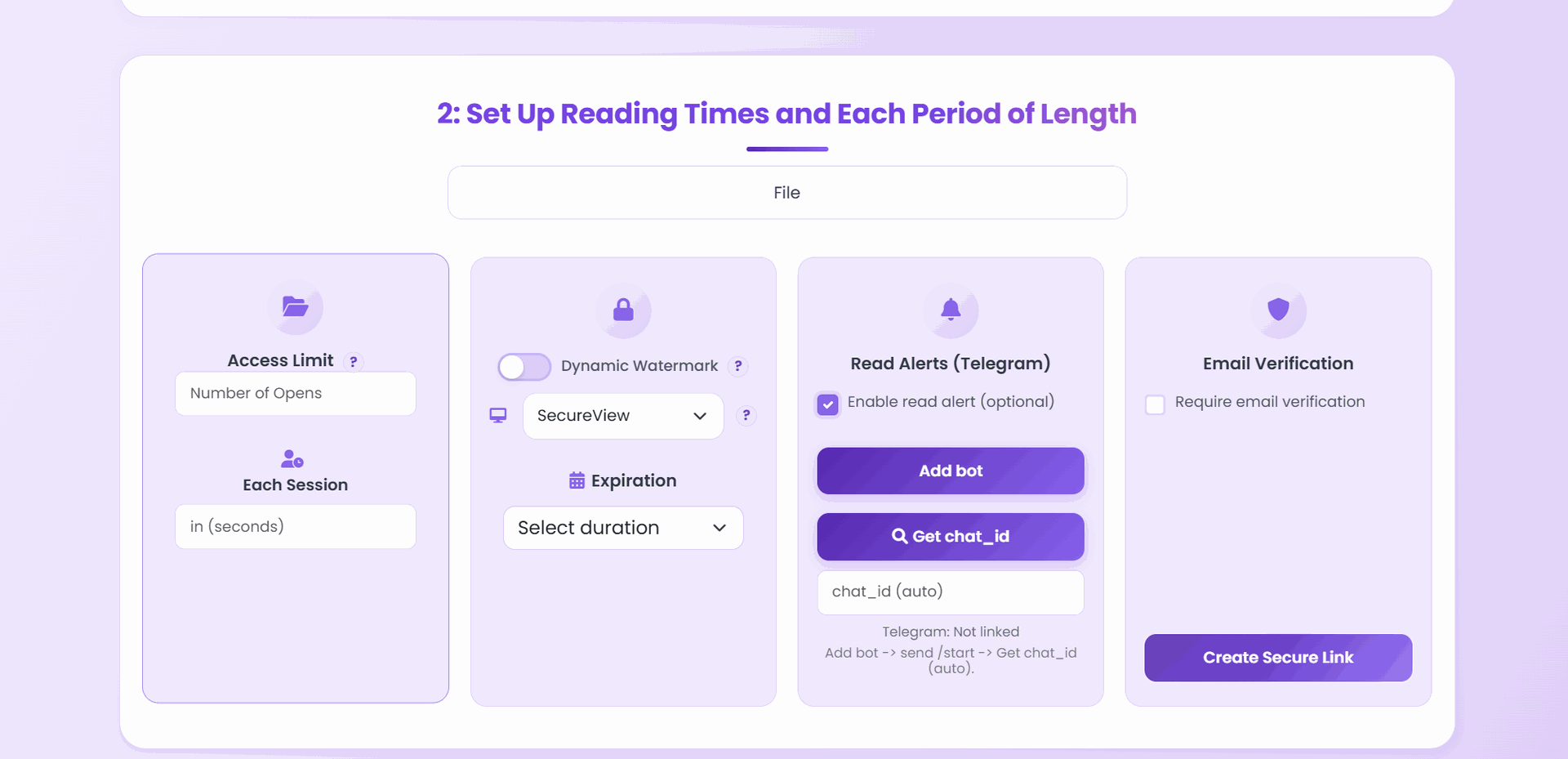
- Online Cloud Sharing is the fast path: upload a PDF, generate a link or QR code, control download behavior, set expiry or view limits, add watermarks, and track opens in the browser.
- App DRM /
.maipdfis the stricter path: package the PDF for the MaiPDF App protected reader when you need screenshot-aware controls, device binding, license checks, and revoke-after-send workflows.
If you are not sure which path fits your file, start with Online PDF Sharing vs App DRM. If screenshots or protected-reader behavior are the main concern, read Secure PDF Reader with Screenshot Protection and Free PDF Screenshot Protection Software.
Quick navigation
- The forwarding paths (and what stops each)
- The anti-forwarding stack
- Policy templates by document type
- Setup walkthrough
- Auditing the access log
- Incident response when a leak happens
- Common failure points
- FAQ
- Related reading
The forwarding paths (and what stops each)
Name the door, name the lock. Anything you don’t lock is how the document walks out.
| How a PDF actually gets forwarded | What stops it |
|---|---|
| Reader saves the raw file → forwards the file | Download off |
| Reader uses Print → Save as PDF → forwards | Print off (paired with download off) |
| Reader forwards the URL itself to someone outside the group | Email verification with a whitelist |
| Reader screenshots a page and pastes it into chat | nothing blocks the screenshot, but Dynamic watermark puts their identity on it |
| Reader photographs the screen with a phone camera | same — watermark + access log traces it back |
| Reader sends the URL via encrypted messenger | Open limit caps how many strangers can actually use it |
| Old link gets rediscovered months later | Expiry kills it before rediscovery matters |
| Reader forwards and the recipient pulls the deck into their competitor’s slide | watermark makes it a traceable leak instead of an anonymous one |
The insight: no single lock covers every door. Download-off without email-verification still lets strangers open the URL. Email-verification without a watermark still lets approved readers screenshot anonymously. The stack is the protection.
The anti-forwarding stack
Six layers. Not every document needs all six — but every control solves a different path, so skipping one is skipping a failure mode.
Layer 1 — Download off + Print off
Closes the “save a local copy” and “print-to-PDF” paths. If you turn download off but leave print on, readers just Print → Save as PDF and walk away with a downloadable copy. Turn both off together.
Layer 2 — Open limit (audience × 1.5)
Caps how many total opens the link can do. If it starts getting forwarded outside your audience, the cap fills and the link stops working. Size it to audience × 1.5 to account for mobile reading’s 3–5× multiplier — see the view-limit calculator for the arithmetic.
Layer 3 — Expiry
No document stays sensitive forever, but sensitive links do stay alive forever unless you close them. Set an expiry matched to the real review window; the URL dies before it can be rediscovered months later in an archived email.
Layer 4 — Email verification with a whitelist
This is the layer most people skip, and it’s the one that turns “forwarding is annoying” into “forwarding doesn’t work.” Only the email addresses on the whitelist can open the link at all. A forwarded URL to a non-whitelisted reader is useless.
Layer 5 — Dynamic watermark (verified email)
If email verification is on, the watermark stamps the reader’s real email on every page. Every screenshot, every camera photo, every printed page (if you’d allowed printing) carries the leaker’s name. The deterrent effect is large; the forensic power after a leak is larger.
Layer 6 — App DRM instead of a browser link
Tightens the viewer itself — session handling, selection behavior, screen-grab deterrents. Reserved for documents where the cost of a leak is materially high: contract drafts, board decks, unreleased IP.
Policy templates by document type
| Document | Download off | Print off | Open limit | Expiry | Email verify | Watermark | App DRM |
|---|---|---|---|---|---|---|---|
| Sales proposal / pitch deck | ✓ | ✓ | 20–40 | 7–14 days | optional | ✓ | – |
| Contract draft under review | ✓ | ✓ | 8–10 | 3–7 days | ✓ | ✓ | ✓ |
| Internal sensitive draft | ✓ | ✓ | 15 | 7 days | optional | ✓ | – |
| Board / investor deck | ✓ | ✓ | audience × 2 | meeting week | ✓ | ✓ | ✓ |
| Partner-only pricing | ✓ | ✓ | 5–20 | 7 days | ✓ | ✓ | ✓ |
| Pre-launch product preview | ✓ | ✓ | 15 | launch date | ✓ | ✓ | ✓ |
| Unreleased creative work | ✓ | ✓ | 5–10 | review window | ✓ | ✓ | ✓ |
| Training handout | – | – | 50+ | 30 days | – | – | – |
| Public brochure | – | – | – | optional | – | – | – |
Don’t over-engineer the low-risk rows. A training handout with every control cranked on creates support tickets for no protection gain; the top rows are where the stack actually earns its keep.
Setup walkthrough
- Upload the PDF at maipdf.com.
- Pick the row closest to your document from the template table.
- Configure the controls in that order: download/print → open limit → expiry → email whitelist → watermark — then decide whether the document warrants App DRM instead of a browser link.
- Generate the link.
- Test with a non-whitelisted email — the most common failure mode for “prevent forwarding” is an email whitelist that doesn’t actually lock anything because it was misconfigured.
- Open the access log 48 hours after sending and confirm only expected readers have opened it.
Auditing the access log
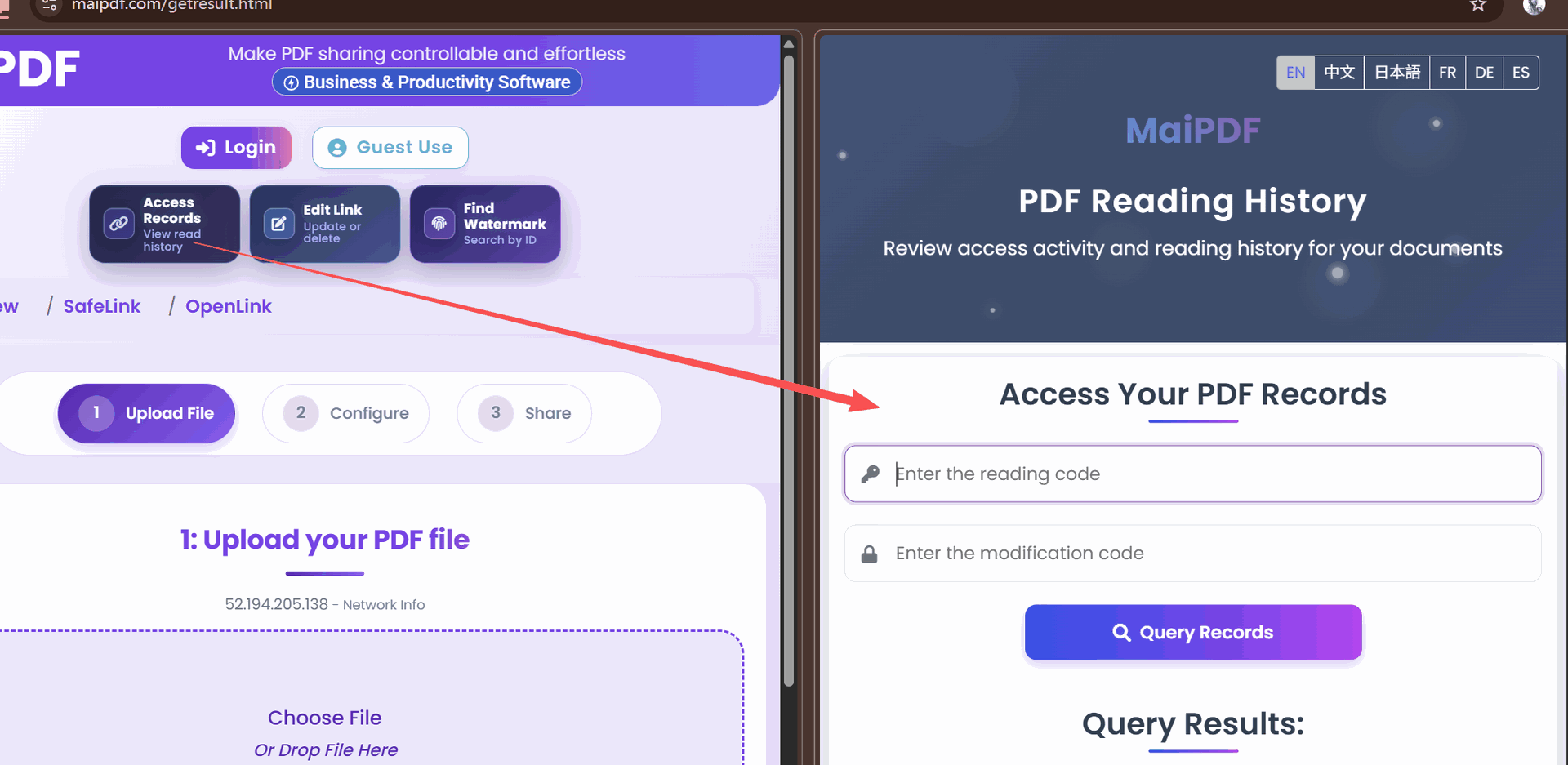
An anti-forwarding stack with no audit is half a stack. The access log is where you find out whether forwarding happened before you hear about it externally.
What to look for:
- Unfamiliar verified emails — addresses that shouldn’t be on your whitelist but somehow are; someone may have added a forwarder
- View-count climbing faster than your audience size — a link “forwarded internally” is quietly being opened by 40 people instead of the 10 you intended
- Opens from unexpected locations/devices — your proposal is going to one domestic buyer, but an open is happening overseas on mobile at 3 AM
- Repeated rapid opens from the same signature — someone is downloading via screen-scrape
- A spike of new opens right after you mentioned the link in public — the link got extracted from somewhere it shouldn’t be
Incident response when a leak happens
Even the full six-layer stack doesn’t make forwarding impossible. It makes it hard, slow, and identifiable. When a leak does happen:
- Revoke the link immediately. One click in the control panel. The URL stops working everywhere; old copies of the link become dead.
- Identify the leaker. Pull the leaked artifact (screenshot, forwarded email, printed page). Read the watermark off it. Cross-reference with the access log — session timestamp, verified email, device.
- Generate a new link for the still-approved audience. New URL, new access log; leaver is not on the new whitelist.
- Tighten the policy for the next send. If the leak came via an email-verified reader screenshotting, note that no browser setting could have stopped that — the next version of this document goes out through App DRM. If it came via someone outside the whitelist somehow, audit the whitelist for typos and forwarders.
- Document the incident. Most organizations find they need internal guidance the moment a leak happens; write it down now, not the next time.
Common failure points
| Failure | Why it happened | Fix |
|---|---|---|
| Download off but Print on | reader Print-to-PDF’d a local copy | pair download-off with print-off |
| Watermark on but email verification off | screenshot shows only a session ID, not a reader name | turn on email verification so the stamp is the name |
| Email whitelist never tested | looks locked, actually admits anyone | test with an off-list email before every send |
| Same URL for every audience | can’t tell engagement apart, can’t revoke selectively | one link per audience segment |
| Attachment sent alongside the controlled link | readers open the attachment, bypass every control | send the link only |
| Open limit equal to exact audience size | mobile reloads lock out the last reader | multiply by 1.5 |
| Never revoking after the review window | old sensitive links stay alive for months | expire automatically, or revoke manually |
| No access-log review | forwarding happens, you find out from a competitor | check the log within 48 hours |
FAQ
Can I make forwarding literally impossible? No — and any tool claiming otherwise is overselling. The goal of anti-forwarding is to make it hard enough that casual forwarding stops, auditable enough that deliberate forwarding gets caught, and time-bounded enough that forwarded links die before they matter.
Does the reader know all these controls are on? They notice the download/print buttons missing and (depending on your watermark opacity) see the watermark on the page. They don’t see the expiry date or the open limit — those are invisible until hit.
What happens when a reader hits the open limit? The link stops loading the document. Expected opens will see an “access-limit reached” page. There is no field to edit the cap afterwards — replace the share with a PDF carrying the higher count, and the URL stays the same, if you need to let a late reader in.
If I forgot to set email verification at first, can I add it retroactively? Yes. All controls on the stack are editable from the control panel; every change applies to the next open without changing the URL.
Does App DRM break accessibility? Core reading works normally — page rendering, scrolling, zoom, and search stay intact. Some screen-reader tools may see friction; test with real assistive-tech users if that’s a hard requirement, and consider a separate, audibly-tagged exception link for genuine accessibility needs.
Is there a “nuclear button” to kill the whole document everywhere? Revoking the link is the nuclear button. After that, no copy of the URL works. Screenshots and copies already in the wild aren’t recoverable — that’s an information problem, not a technology one.