Free Online DRM for PDF: Browser Sharing vs App DRM
.maipdf is for protected-reader, license, device, revocation, and screenshot-aware workflows.
Free Online DRM for PDF: Browser Sharing vs App DRM
People often search for free online DRM for PDF when they want one thing: send a PDF, keep some control, and avoid losing the document forever after it is forwarded.
MaiPDF has two different protection paths. They should not be mixed together:
- Online Cloud Sharing is the browser-based path at maipdf.com. It creates a reading link or QR code, then lets you manage web-link controls such as view limits, expiry, watermark, access records, and replacing the file behind the same link.
- App DRM /
.maipdfis the protected-file path at drm.maipdf.com. It creates a protected.maipdffile that opens in the MaiPDF App, then lets you manage the license: opens, expiry, devices, recipients, open events, revocation, and reactivation.
The short version: Online Cloud Sharing controls a browser link. App DRM controls a license for a protected file.
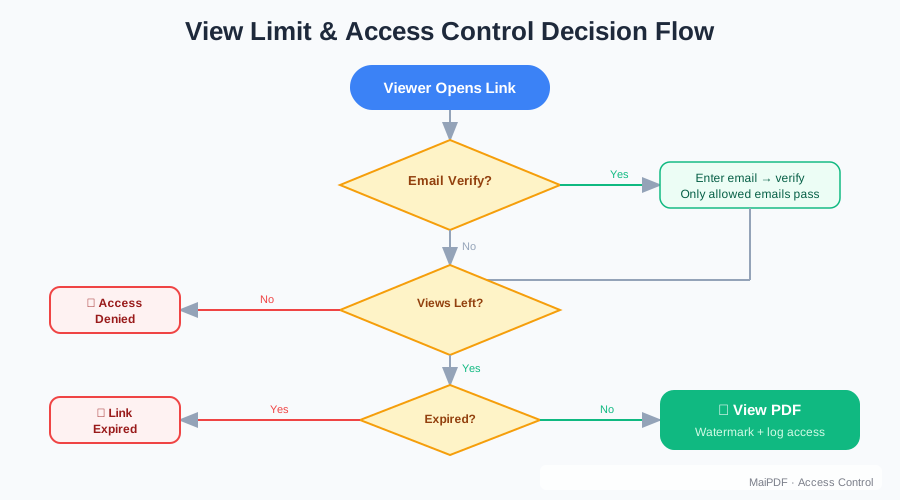
What “free online DRM for PDF” really means
Strict DRM usually means a protected reader, a license check, and stronger control over where the file can open. A normal browser cannot provide all of that.
So when we say free online DRM for PDF, the online part means browser-based access control:
- the reader opens a link in a web browser
- you can add controls around that link
- you can update or disable the web-sharing setup later
- the reader does not need to install an app for ordinary online reading
That is useful, but it is not the same as App DRM. App DRM exists for cases where a browser link is not strict enough.
Path 1: Online Cloud Sharing for browser links
Use Online Cloud Sharing when you want a fast PDF link or QR code that opens in a browser.
With the online path, you can:
- turn a PDF into a secure reading link
- share the same document by QR code
- disable easy browser download in the web viewer
- set view limits or expiry
- add visible watermarks
- check access records and open history
- replace the PDF behind an existing link when the online link should stay the same
This is the right path for quick delivery, simple client review, classroom handouts, temporary reports, and link-based sharing where convenience matters.
Online link management includes file replacement
Online Cloud Sharing is link-based. Because the shared object is a web link, MaiPDF can let you keep the same link while updating the document behind it.
For example, if you sent the wrong version of a proposal, you can use the online control/replacement tools to update the content without asking every recipient to use a new URL.
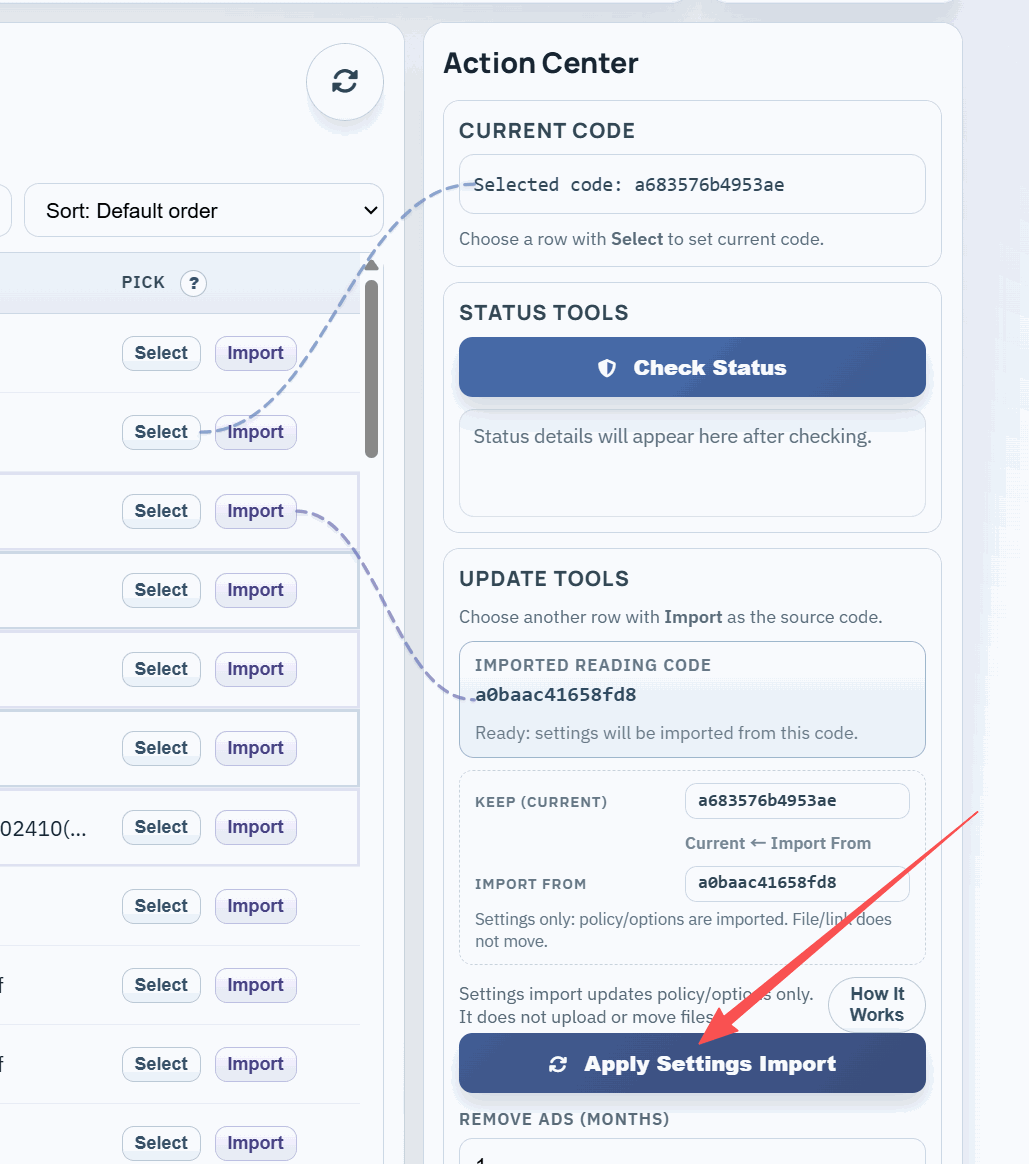
This screenshot is from the online control panel. It belongs to Online Cloud Sharing, not App DRM.
Path 2: App DRM / .maipdf for license control
Use App DRM when the PDF needs stronger control than a browser can provide.
The App DRM workflow is different:
- You select a PDF in the MaiPDF App.
- The app creates a protected
.maipdfpackage. - A license is created for that protected file.
- Readers open the
.maipdfin the MaiPDF App, where the license is checked.
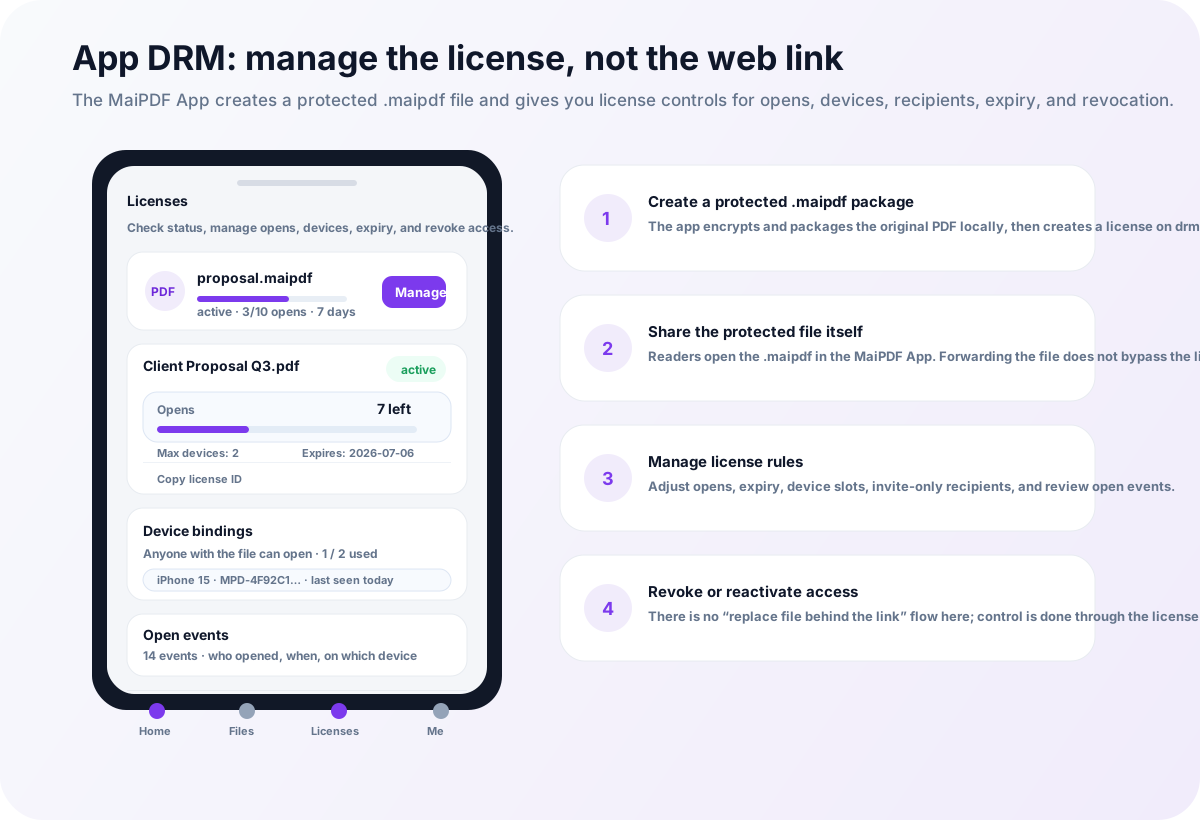
The App DRM management screen is about licenses, not replacing web-link content. From the app code, the license tools are focused on:
- checking license status
- viewing “My licenses” under the signed-in account
- adding or removing allowed opens
- extending expiration
- setting max devices
- managing device bindings
- adding invite-only recipient emails
- reviewing open events
- revoking, deleting, or reactivating the license
There is no online-style “replace the file behind this link” flow in the App DRM license screen. If a PDF needs a new protected file version, you create/share a new .maipdf package and manage its license.
Browser controls vs App DRM
| Need | Better MaiPDF path |
|---|---|
| Send a PDF link quickly | Online Cloud Sharing |
| Share by QR code | Online Cloud Sharing |
| Reader should not install an app | Online Cloud Sharing |
| Disable easy browser download | Online Cloud Sharing |
| Replace the document behind the same online link | Online Cloud Sharing |
| Add watermarks and access records to a browser link | Online Cloud Sharing |
| Open a protected file in a controlled reader | App DRM / .maipdf |
| Reduce screenshot / screen recording risk | App DRM / .maipdf |
| Bind access to devices | App DRM / .maipdf |
| Manage recipients and device slots by license | App DRM / .maipdf |
| Revoke a protected file after it has been sent | App DRM / .maipdf |
What the browser path cannot promise
A browser page cannot fully control the operating system.
Browser-based PDF sharing cannot reliably stop every:
- screenshot shortcut
- screen recording tool
- browser capture method
- external camera or another phone pointed at the screen
If your main concern is screenshot-aware reading, device binding, or stopping a forwarded protected file from opening on another device, use MaiPDF App DRM and protected .maipdf files instead.
Which path should you choose?
Use cases
Education
Teachers can share general course PDFs by link or QR code. For paid workbooks, exam-prep PDFs, or student-forwarding risk, use App DRM / .maipdf so access depends on the protected reader and license.
Client review
Designers, agencies, and consultants can send review documents as controlled online links when the goal is fast feedback. If the document is confidential and should stay tied to license rules, App DRM is the stricter path.
Business documents
Teams can share internal reports with online expiry, view limits, and access records. For files that may be forwarded outside the intended group, App DRM adds device and recipient controls.
Publishing and paid files
Creators can use online sharing for previews, samples, and lightweight distribution. For paid PDFs that need revoke-after-send or device-bound access, use App DRM / .maipdf.
How to start
Bottom line
Free online DRM for PDF is best understood as browser-based link control: easy sharing, QR codes, view limits, expiry, watermarks, access records, and online file replacement.
App DRM / .maipdf is a separate protected-file workflow. It does not rely on replacing content behind an online link; it relies on the MaiPDF App and the license system to control opens, devices, recipients, history, and revocation.