Faster PDF Loading: MaiPDF's Enhanced Performance for Better Document Sharing
Faster PDF Loading: MaiPDF’s Enhanced Performance for Better Document Sharing
Document sharing should be fast and reliable. MaiPDF’s recent performance improvements make sharing PDF files quicker than ever, with significantly faster loading times that benefit both document creators and their recipients.
What’s New in Performance
MaiPDF has implemented several improvements that make the entire document sharing experience faster and more reliable:
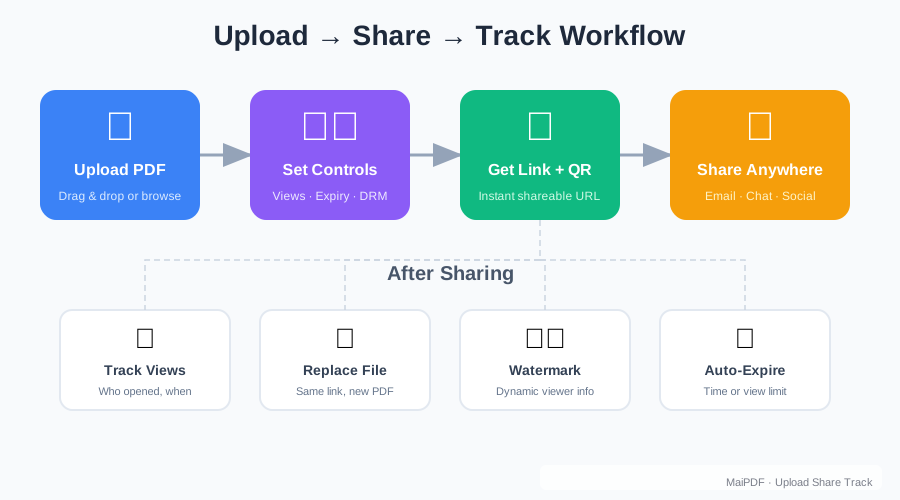
Faster Upload Processing: Files are processed and ready to share in seconds, not minutes.
Quicker Link Generation: Shareable links are created almost instantly after upload completion.
Improved Loading Speeds: Recipients experience faster document loading when they click your shared links.
Better Mobile Performance: Enhanced optimization for smartphones and tablets.
Reduced Wait Times: Less time spent waiting for documents to become viewable.
The Speed Difference You’ll Notice
Upload Speed: What used to take 30-60 seconds for large files now completes in under 15 seconds for most documents.
Initial Loading: Documents appear on screen within 2-3 seconds of clicking a shared link.
Page Navigation: Scrolling through multi-page documents is now smooth and responsive.
Image Rendering: Documents with graphics and images load without delays.
Benefits for Document Creators
Faster performance means you can share documents more efficiently:
- Quick Turnaround: Upload and share documents immediately when time is critical
- Better Productivity: Less waiting means more time for other tasks
- Reliable Sharing: Consistent performance you can count on for important communications
- Professional Image: Fast, responsive sharing reflects well in business contexts
Better Experience for Recipients
The people viewing your shared documents also benefit from the performance improvements:
Immediate Access: Documents load quickly when they click your links, reducing frustration and improving engagement.
Smooth Reading: Page-by-page navigation is responsive, making it easy to browse through longer documents.
Mobile-Friendly: Faster loading on smartphones and tablets means documents are accessible anywhere.
Professional Presentation: Quick, reliable access creates a positive impression of your shared content.
Technical Improvements Behind the Speed
While you don’t need to understand the technical details, several optimizations contribute to the improved performance:
- Enhanced File Processing: More efficient handling of PDF files during upload
- Optimized Delivery: Better content delivery ensures faster loading for recipients
- Improved Caching: Smart caching reduces loading times for frequently accessed documents
- Mobile Optimization: Specific improvements for mobile device performance
Impact on Different Document Types
The performance improvements benefit all types of PDF documents:
Text-Heavy Documents: Reports, contracts, and written materials load quickly and remain responsive during reading.
Image-Rich Files: Presentations, brochures, and visual materials display images efficiently without sacrificing quality.
Large Documents: Multi-page files, manuals, and comprehensive guides load faster and navigate smoothly.
Mixed Content: Documents combining text, images, and formatting benefit from optimized rendering.
Real-World Performance Scenarios
Business Meetings: Share last-minute documents that participants can access immediately, even from mobile devices.
Client Communications: Provide proposals and reports that load quickly, creating a professional impression.
Educational Settings: Distribute course materials that students can access rapidly, improving engagement.
Remote Collaboration: Team members can access shared documents quickly regardless of their location or device.

Maintaining Quality While Improving Speed
The performance improvements don’t compromise document quality:
- Full Resolution: Images and graphics maintain their original quality
- Accurate Formatting: Document layout and styling are preserved
- Complete Content: All text, images, and elements load properly
- Cross-Platform Consistency: Documents look the same across different devices and browsers
How Speed Improves Document Sharing Success
Faster loading times lead to better sharing outcomes:
Higher Engagement: People are more likely to fully review documents that load quickly.
Reduced Abandonment: Fast loading reduces the chance that recipients will give up waiting for documents to appear.
Better First Impressions: Quick, professional document access creates positive associations with your content.
Increased Accessibility: Faster mobile performance means more people can access your documents conveniently.
Getting the Most from Improved Performance
To take full advantage of the speed improvements:
Upload Efficiently: While processing is faster, well-prepared documents still perform best. Ensure your PDFs are optimized before uploading.
Share Strategically: Take advantage of quick link generation to share time-sensitive documents immediately.
Monitor Performance: Use MaiPDF’s access tracking to see how the improved speed affects document engagement.
Leverage Mobile Access: The better mobile performance makes it easier to share documents for on-the-go access.
Future-Ready Performance
The performance improvements are designed to handle growing usage and evolving needs:
- Scalable Infrastructure: Performance remains consistent even as more people use the service
- Device Compatibility: Optimizations work across new devices and browsers
- Network Adaptability: Performance improvements help documents load well on various internet connections
- Continuous Enhancement: Ongoing optimizations ensure performance keeps improving
Try the Speed Difference
Experience the improved performance for yourself:
- Upload a PDF: Notice how quickly files are processed and links are generated
- Share the Link: Send it to recipients and ask for feedback on loading speed
- Test on Mobile: Try accessing shared documents from your smartphone or tablet
- Compare: Notice the difference compared to other document sharing methods
The combination of faster processing, quicker loading, and improved mobile performance makes MaiPDF an excellent choice for anyone who values efficiency in document sharing.
Whether you’re sharing a single important document or managing multiple files for different audiences, the enhanced performance ensures that speed never becomes a barrier to effective communication. Your recipients get quick access to your content, while you benefit from faster, more reliable document sharing.
Try uploading your next document and experience the difference that improved performance can make for your document sharing workflow.