Enterprise Document Distribution: A Practical Security Workflow
Enterprise Document Distribution: A Practical Security Workflow
2026 update: This guide mainly covers browser-based Online Cloud Sharing: controlled links, expiry, view limits, watermarks, access records, and download/print restrictions. For files where screenshot risk, device sharing, refund abuse, or post-contract revocation matters, use the stronger App DRM path: protected
.maipdffiles opened in the MaiPDF App with device binding, license revocation, protected reading, and traceable watermarks. A browser cannot fully block operating-system screenshots, and no software can stop someone from photographing a screen with another phone.Start here if you are choosing between the two paths: Online PDF Sharing vs App DRM, secure PDF reader with screenshot protection, and how to revoke access to a PDF after sending.
Enterprise distribution isn’t “send a PDF and hope.” It’s a repeatable workflow: define access, deliver safely, and keep a record of what happened.
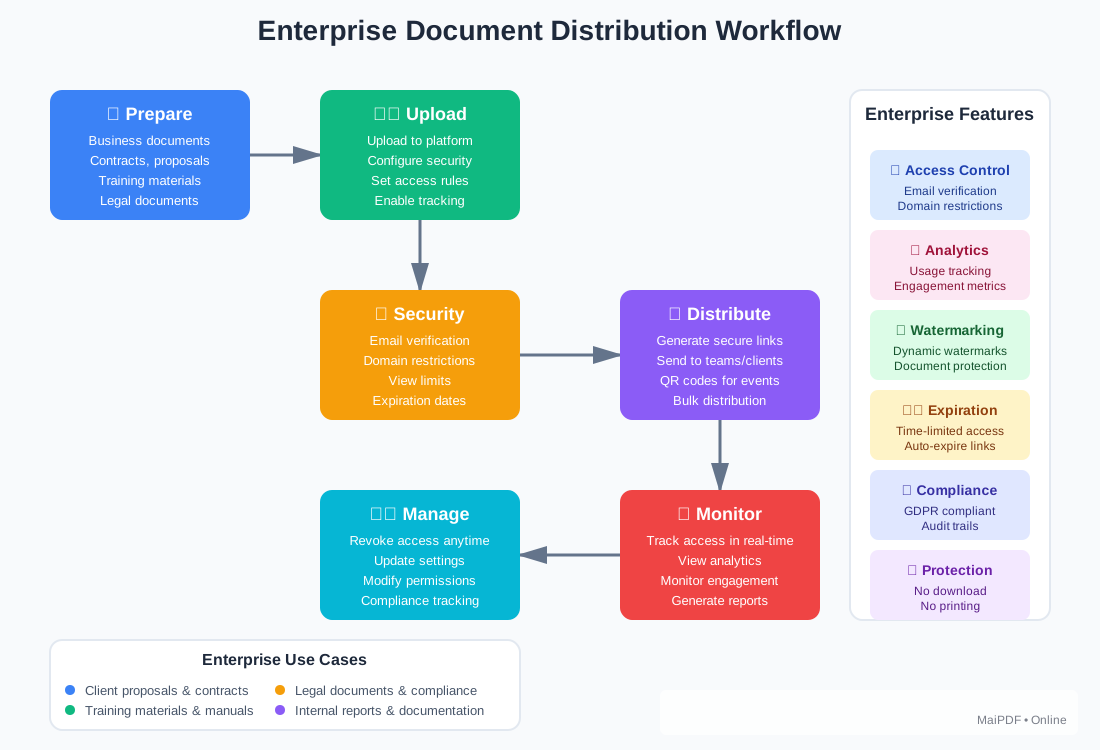
The workflow (what the diagram captures)
1) Prepare
- Classify: public vs internal vs confidential
- Decide audience: named recipients or open access
- Set the “default minimum”: start restrictive, loosen only when needed
2) Control
- Verification: email/phone/password depending on risk
- Limits: view count and expiration to reduce leak window
- Restrictions: download/print prevention where appropriate
What to standardize (so this scales)
- A reusable policy template per document type (HR, legal, sales, training)
- A review step for high-risk documents (two-person rule)
- An emergency stop (ability to disable access quickly)
Common failure modes
| Failure | What happens | Fix |
|---|---|---|
| “Anyone with the link” access | forwarding spreads access | add verification + expiration |
| Permanent links | old versions keep circulating | use short-lived links + replace content |
| No access records | no audit trail | enable logging/export |